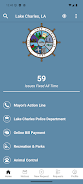


OneLC Action Line puts LC Connect in your pocket and gives Lake Charles residents a simple, reliable way to report non-emergency neighborhood issues, discover local resources, and follow up on city service requests. OneLC Action Line centralizes reports such as potholes, damaged sidewalks, overgrown lots, broken street signs and similar concerns so you can attach photos, add contextual details, and track each request as it moves through municipal channels without hunting down separate phone numbers or department contacts.
Key features and how they work
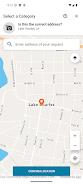
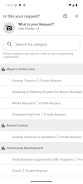
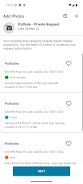
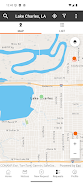
The app provides a guided report form that walks you through category selection, location capture, photo attachment and a short description field to explain the problem. You can capture photos with your device camera or choose images from a gallery, add multiple images for better clarity, and mark the exact location on an interactive map or by using your device GPS. Submitted reports are routed to the appropriate city service areas and assigned a reference number so you can check progress. A built-in community calendar and resource hub list scheduled municipal events, public meetings and commonly used contact information for city programs, providing a single place to stay informed about local services.
User controls and interaction
Controls are designed for quick, repeatable use: the primary workflow uses simple taps to select a problem type, a text field for details, and a confirm button to submit. Map controls allow pinch-to-zoom and manual pin placement for precise location reporting. The camera interface supports common gestures and a thumbnail preview so you can verify images before sending. Notification settings let you choose whether to receive push alerts, email updates or both. The app respects device permissions and clearly explains why access to location, camera and storage is needed, giving you control to grant or revoke permissions at any time.
Submission flow, status tracking and progression
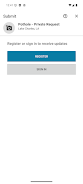
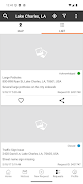
Once a report is submitted, OneLC Action Line provides a transparent progression system: initial acknowledgment, assignment to a department, status updates and final resolution. Statuses are time-stamped so you can see when an item was received, reviewed, scheduled for work, or completed. Where available, priority indicators help set expectations about response times. You can reopen or add follow-up comments to a request if the issue persists, and the app stores a searchable history of your past reports so you can monitor recurring problems in your neighborhood.
Customization and personalization
Personalization options include saving frequently used locations (home, work, a community area), creating reusable description templates for common report types, and filtering the events and resource listings by category. Notification preferences allow you to limit alerts to certain report types or to receive weekly digests instead of immediate push messages. These simple customizations reduce friction for repeat reporting and help you stay focused on the issues that matter most in your community.
Accessibility, offline use and reliability
The app is built with accessibility in mind: readable type sizes, clear color contrast for status indicators, and straightforward language throughout the forms. Basic screen reader compatibility and large tappable targets improve usability for a wide range of devices and users. If you lose connectivity while composing a report, a draft save feature preserves text and images and automatically submits when a connection is restored, so you do not have to start over. The app is lightweight by design to minimize battery and data usage during normal operation.
Scope, appropriate use and community value
OneLC Action Line is intended for non-emergency municipal needs and is not a substitute for 911 or urgent public safety reporting. Coverage is focused on services and programs provided by the City of Lake Charles; response times and available actions vary by issue type and department capacity. The app encourages constructive reporting: clear photos, accurate descriptions and correct locations help city staff assess and prioritize work. Over time, consistent use by residents helps identify recurring problems, informs maintenance planning and improves neighborhood quality of life.
Design, visual cues and ongoing maintenance
The visual style favors a clean, civic design with color-coded status badges and intuitive icons that make it easy to scan lists of submissions. Map thumbnails, timeline stamps and report previews allow quick review of each item, and the centralized resource hub is maintained to reflect current city programs and event schedules. Regular updates improve stability and keep municipal information accurate so that OneLC Action Line remains a dependable tool for residents engaging with city services.