






Do1 is a habit-building app that combines the Kaizen philosophy and on-device AI to turn large ambitions into tiny, daily actions you can complete without planning overhead. Do1 helps you move away from long lists and motivational bursts by generating compact, achievable micro-tasks—each goal can be decomposed into up to 90 progressive steps—so you see steady, measurable improvement rather than bursts of effort that fade. The introductory experience emphasizes simplicity: a single mission each day, clear visual feedback, and a gentle focus on consistency over intensity.
Key features and how they work
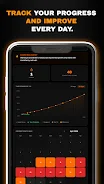
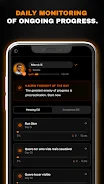
The app creates a one-item-a-day workflow: you receive a micro-action designed to be small enough to succeed while still nudging growth. AI-assisted decomposition automatically proposes a sequence of up to 90 micro-tasks for any goal you define, saving time that would otherwise be spent planning. Visual tools let you compare actual progress against an ideal growth curve so you can watch compound gains accumulate, and a monthly consistency map highlights patterns of activity and breaks to help you diagnose friction points. Built-in streaks, scoring and 10-day milestones add gamified feedback so that returning after a lapse restores momentum while repeated wins build measurable momentum.
Gameplay mechanics and controls
Do1’s interaction model is intentionally minimal: tap to complete a daily task, swipe to preview upcoming micro-tasks, and long-press to add a short note or adjust difficulty. Tasks are written as practical, single-focus actions aimed at removing friction—no long timers or complex input required. You can edit task wording or mark a day as partially complete if you made progress but did not hit the exact target. Notifications are configurable so reminders feel helpful rather than intrusive. The app’s control layout is designed for quick one-handed use on phones, with clear labels and predictable gestures to keep the barrier to action low.
Progression systems and level structure
Progress in Do1 is organized around a 90-step structure that acts like a multi-week curriculum for each objective. Each step is deliberately small to facilitate daily repetition; together the steps form a linear progression with built-in short milestones every 10 days. Completing steps advances your score and contributes to streaks, while the compound-interest chart shows how small daily improvements accumulate over time. If you need a shorter timeline, you can compress difficulty by adjusting how tasks are scaled; if you prefer a slower pace, tasks can be softened so each step feels more incremental. The structure is transparent so you always know where you are in the sequence and what’s coming next.
Visual style and customization
The interface leans toward a clean, data-forward aesthetic: progress charts, a heatmap-style consistency calendar, and simple card-based task views reduce visual clutter and focus attention on action. Customization options allow you to name goals, choose icons and color accents, and set reminder windows that match your daily routine. You can tag tasks for different life areas—study, fitness, creative work, professional development—so the dashboard filters to what matters most. The result is a workspace that feels personal without requiring extensive setup.
User experience, accessibility and offline play
Do1 is designed to be lightweight and responsive on a wide range of Android devices, with readable fonts and adjustable contrast to aid accessibility. Text labels and touch targets follow mobile accessibility conventions so people with varying dexterity or vision needs can interact comfortably. The core micro-task sequence and local progress tracking work offline, allowing you to complete missions and record results without an internet connection; synchronization or cloud features are optional if you choose to enable them. Short contextual help and sample goals make first-time setup quick, and progressive disclosure keeps advanced settings out of the way until you want them.
Challenge systems, replay value and limitations
Replay value comes from the variety of goals you can pursue and the adaptability of the micro-task design: you can reset a goal to try a new approach, increase difficulty to push for faster gains, or create multiple parallel goals for different life areas. The scoring and milestone loop creates a forgiving challenge that rewards consistency rather than intensity. Limitations are intentional: the small-step method can feel slow if you expect rapid transformation, and the emphasis on daily consistency means repeated missed days will affect streaks and scoring. The fixed 90-step upper bound may not perfectly fit every project timeline, but tasks are editable so you can tailor pace and phrasing to your needs.
Who benefits most
Do1 is best suited for people who prefer steady, habit-driven progress—students who want to build study routines, creatives building a regular practice, or anyone aiming for slow, reliable gains in fitness or professional skills. It is not built for one-off, time-boxed challenges that require heavy intensity; instead it helps make action the default and planning a small part of the daily routine. By keeping interactions simple, visually tracking compound improvements, and offering flexible pacing, Do1 turns large goals into a series of manageable steps you can sustain over months and years.





