





Sphere

| Package ID: | |
|---|---|
| Latest Version: | v1.21 |
| Latest update: | May 24, 2026 12:06:03 |
| Developer: | Artistic Milliners |
| Requirements: | Android |
| Category: | Finance |
| Size: | 88.25 MB |
| Tags: | Navigation Photo Date |
Rating :4.2
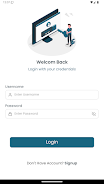
Sphere is a one-stop employee self-service solution; Sphere streamlines HR interactions by offering multiple ways for staff to engage with human resources, and Sphere centralizes common HR tasks into a single interface to reduce paperwork and speed routine decisions. The Sphere mobile app focuses on simplifying everyday workflows so employees can request information, submit forms, attach documents, and communicate with HR without chasing physical paperwork, helping teams work more efficiently and enabling HR to prioritize higher-value activities.
Key Features
The app collects common HR tasks into a compact set of tools: form submission, request tracking, document upload, approval routing, and an activity feed that surfaces important items. Sphere lets users initiate requests from templates or custom forms, attach photos and PDFs, and follow the status of approvals. Notifications, reminders, and a searchable history help employees find past requests and HR staff to keep processes moving. The app also records simple audit trails so administrators can review handoffs and timestamps without digging through email chains.
How It Works
Sphere guides a request from creation to resolution through a clear progression system. A user fills a form or selects a common request type, adds optional attachments and notes, then submits to a predefined approval path. Approvers receive a compact summary and can approve, request more information, or route the item to a different reviewer. Each step is reflected in the app’s timeline so both the requester and HR know where a request sits and what action is next.
User Interface and Controls
The interface in Sphere is designed for straightforward touch controls: tap to open forms, swipe through active requests, and use simple menus to select recipients or categories. Input fields support autocomplete for frequently used codes or departments, and a consistent layout reduces friction when completing routine tasks on a phone or tablet. Visual indicators show pending approvals, required actions, and items needing attention so users can prioritize work quickly.
Progression and Task Structure
Requests in Sphere follow a clear lifecycle: draft, submitted, under review, approved, or closed. Administrators can define multi-step workflows with conditional routing so common scenarios are handled without manual intervention. This progression model not only keeps employees informed of status changes but also provides measurable checkpoints for HR teams to evaluate processing times and identify bottlenecks.
Visual Style and Level Organization
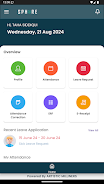
Sphere uses a clean, business-focused visual style that emphasizes readability and fast scanning. Screens are organized into modules—Requests, Inbox, Templates, and History—so users quickly learn where to start and how to follow up. Consistent typography and restrained use of color highlight actionable items and reduce cognitive load when managing multiple tasks.
Customization and Administration
Administrators can customize templates, approval chains, and notifications to match existing policies, and they can add or remove fields from forms to capture the right information. Role-based access controls limit who can see or act on sensitive requests, and configurable notifications ensure that only relevant people are alerted at each stage. Sphere’s administrative settings allow organizations to tailor the app without heavy technical setup.
Replay Value and Daily Use
Sphere’s value grows with regular use: routine tasks like leave requests, equipment requests, and simple information queries become faster over time as employees and managers adopt standard templates. The app is useful for repeated daily or weekly workflows, and the searchable history encourages self-service by letting staff find previous answers instead of reopening support lines.
Accessibility, Offline Use, and Performance
Sphere supports accessibility best practices such as clear contrast, readable font sizes, and simple navigation to help users with varying abilities. Basic offline capabilities let users draft requests and attach files without a constant connection; submissions queue and synchronize automatically when a network is available. The app is optimized for quick loading and minimal battery impact to fit into busy workdays.
Security, Maintenance, and Adoption
Data is stored according to organizational policies and access is controlled through role permissions and audit logs. Successful deployment of Sphere typically includes initial configuration and user training to ensure workflows match internal practices; change management and manager buy-in are important to achieve adoption. Ongoing maintenance—keeping templates and approval paths current—ensures the app continues to reduce administrative overhead over time rather than becoming another source of outdated data.
Limitations and Considerations
While Sphere centralizes many HR interactions, organizations should plan for initial setup and periodic reviews of workflows so benefits are realized. Adoption may require adjustments to existing processes and training for managers and staff. The app’s effectiveness depends on accurate HR data and thoughtful configuration, but when set up thoughtfully Sphere can significantly streamline routine HR activity and improve responsiveness across the organization.






