
Plant App is a compact inventory tool designed for plant sellers, collectors and hobbyists who need a clear, no-frills way to record living stock. Plant App puts collections and individual plant entries at the center of the workflow so users can capture genus and species, attach photos and track status changes such as sold or lost without navigating complex menus.
Key features
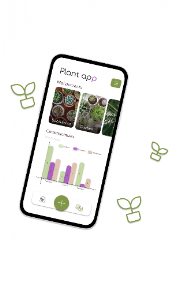
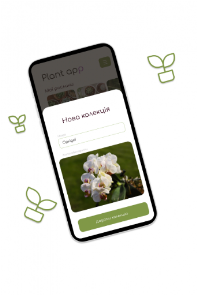
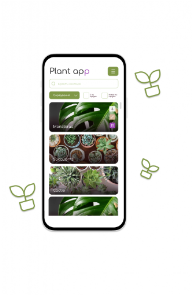
The core of Plant App is a simple collection-based structure that supports unlimited collections, each with a customizable name, cover photo and a visible creation date so you can group plants by source, greenhouse, nursery table or personal theme. Within each collection you add plant entries that include basic fields for genus and species and a photo attachment to create a visual catalogue. Each entry opens into a full-detail view where you can edit information, update status and check timestamps. A separate view surfaces sold items and lost items so transactional status does not clutter active inventories. Basic monthly and seasonal statistics summarize counts of added, sold and lost plants to give a quick overview of activity over time.
How it works and controls
Plant App is built around direct, touch-friendly controls: create a new collection, open it and tap to add a plant entry; use in-place editing to change species text or swap photos; and mark entries as sold or lost with a single command. Navigation is linear and predictable, focusing on fast data entry rather than deep configuration screens. Photos are attached from the device gallery or camera and display as thumbnails in collection lists for quick visual scanning. The interface is intentionally light so common tasks — adding new plants, reviewing details and changing status — take minimal steps.
Organization, progression and daily use
Organization in Plant App mirrors a progressive catalogue: you start by creating collections that represent a logical division of your inventory, then add plant records as you acquire or propagate items. Over time the catalogue grows and becomes a searchable mental map of what you own and what you have sold. Progression is expressed through cleaner records and seasonal summaries; each month or season’s counts let you see trends in additions, sales and accidental losses so you can refine sourcing, pricing or propagation plans. Routine use of the app becomes part of regular shop or collection maintenance rather than a separate administrative burden.
Customization and visual style
While the visual approach remains minimal, Plant App offers simple customization that improves readability and recognition: collection cover photos, photo-equipped plant entries and clear date labels help you scan lists quickly. The layout prioritizes legible type and uncluttered screens so photographs and species fields remain the focal point. This minimal visual style reduces distraction and keeps the app responsive on a range of Android devices while preserving clear visual cues for identification and presentation.
Statistics, reporting and practical use cases
The statistics feature in Plant App focuses on practical clarity rather than exhaustive analytics. Monthly and seasonal summaries provide counts of how many plants were added, how many were sold and how many were lost, which is useful for small sellers, market vendors and hobbyists tracking propagation success. These compact reports are intended for quick operational decisions — for example, identifying busy sales months or propagation windows — and work well when you prefer simple numeric feedback over complex charts. The app does not produce detailed financial reports or advanced metric breakdowns; it is best used alongside whatever bookkeeping system you already prefer.
Accessibility, offline use and reliability
Plant App is designed to be usable without network connectivity so you can add entries and view collections in greenhouses, farms or markets where signal may be limited. The interface emphasizes large touch targets and clear contrast to support quick data entry in varied lighting conditions. Because data entry and image storage happen locally on the device, there is no dependency on cloud services for everyday operation; this makes the app reliable for fieldwork but also means users should maintain their own backup routines if cross-device syncing is required.
Limitations and realistic expectations
Plant App intentionally keeps feature scope tight to remain fast and approachable. Statistics are limited to monthly or seasonal intervals and report only counts of added, sold and lost plants rather than finer-grained metrics or custom date filters. There are no built-in advanced reporting, online multiplayer, ranking or marketplace features. For users who need comprehensive analytics, export functions or cloud sync, Plant App provides a straightforward inventory baseline that can be complemented by external tools, while continuing to serve as a clean, photo-forward plant catalogue for daily management.






