
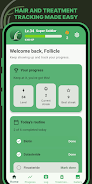
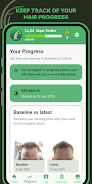

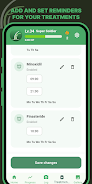
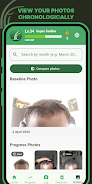
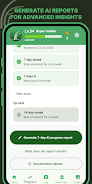

Follicle is a focused hair growth tracker and photo journal designed to help you document subtle changes over weeks and months. The app places emphasis on consistent, private photo capture and simple logging so users monitoring regrowth, thinning, or maintenance routines can build an accurate visual record without technical complexity. Follicle centralizes images, treatment notes and reminders into a single on-device gallery, and includes tools for side-by-side comparisons and downloadable progress reports so you can review trends at a glance and share findings when needed.
Key features
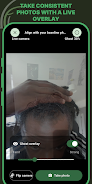
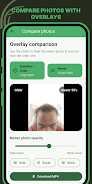
The app provides a private photo gallery where you can organize progress photos into albums, add captions and tag images by date or treatment. A live Ghost Overlay floats a faint reference image over the camera preview to help you reproduce the same angle and framing during every capture. Before-and-after comparison modes place images next to each other with zoom and pan controls so small differences become easier to spot. Treatment logging supports entry of product names, application notes and dosage or frequency, and you can schedule reminders to maintain a regular routine. Visual timelines plot photos and entries across weeks and months to reveal patterns, and simple AI-assisted reports can be generated and downloaded to summarize visible changes and treatment history for offline review.
How it works
Using Follicle begins with a single baseline photo and a short profile that records dates and the treatments you are trying. Capture tools guide you through consistent framing: the Ghost Overlay can be adjusted in transparency and size, the camera offers a grid and tap-to-focus, and you can set a self-timer to steady the shot. Each photo is automatically time-stamped and placed in a timeline; you can add notes to individual images to record lighting conditions, product used or any temporary factors that might affect appearance. Over time the timeline fills with dated entries that help you and any professional you consult to evaluate progress objectively.
Controls and user experience
Controls are kept intentionally simple so daily tracking is quick. The capture screen presents minimal buttons for overlay toggle, flash control and a shutter, while the gallery uses swipe gestures to move between dates and pinch-to-zoom to examine details. Editing tools let you crop and rotate images without altering the original file so comparisons remain reliable. The interface uses a clean, high-contrast layout and adjustable text sizes to support readability for a wide range of users; accessibility settings respect device-level font scaling and system contrast options where available.
Progress, reports and export
Progression is presented as a chronological visual story: you can filter images by tag or treatment, mark milestones and view side-by-side snapshots from any two dates. AI-assisted analysis provides an optional summary of detected changes and can create a downloadable report that bundles selected photos, annotations and your treatment log. Reports are intended as a convenient way to archive progress or to share with a clinician; they are not a replacement for professional medical advice. Export options focus on simple, portable formats so you can save reports to your device or print them for offline review.
Customization and replay value
Follicle supports custom albums and tags so you can create a tracking structure that fits your goals, whether you are testing a single treatment or comparing multiple approaches. Consistent tracking creates replay value: returning to the app becomes part of a daily or weekly routine, and reminders help maintain adherence. Because the core activity is documenting change through images and notes, the app naturally encourages long-term use as your visual archive grows and comparisons become more informative over time.
Privacy, offline use and limitations
Privacy is handled by keeping the gallery on your device by default and offering straightforward export controls rather than automatic cloud sharing. You can back up or export reports manually if you want an off-device copy. The app works fully offline for capture, logging and local review, which helps preserve privacy and ensures access without a network connection. Limitations include dependence on consistent lighting and camera angle for the most reliable comparisons, and while AI reports can highlight trends they do not replace diagnosis or personalized medical treatment. If you have concerns about hair loss or scalp health, consult a qualified professional.






