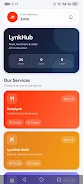
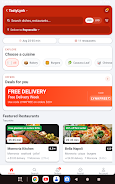
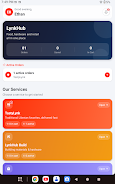

LynkHub is a single-app marketplace that brings restaurant ordering, hardware supplies and retail shopping together so you can browse, compare and check out without switching apps. LynkHub puts menus, contractor-grade materials and everyday retail items in one searchable interface, designed for people who want practical convenience from a single mobile app. The opening experience introduces local vendors, clear product listings and a compact checkout flow so newcomers can place their first order quickly while regular users build a routine around frequent purchases.
Key features and shopping flow
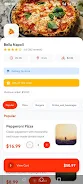
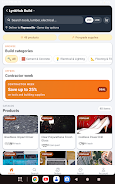
The app presents three main storefront types — food, hardware and general retail — each with its own listing layout and filters to refine choices by price, distance, vendor rating or category. Search and filtering controls are thumb-friendly: a single search field, category tabs, and persistent cart access let you add items as you discover them. Product and menu pages show images, descriptions, available sizes or quantities, and estimated delivery or pickup times where vendors provide that information. A lightweight checkout consolidates cart items from different vendors into one payment step when supported, with an order confirmation screen and a clear order history so you can track past purchases and reorder favorites.
User experience, controls and personalization
The interface focuses on simple, consistent controls: tap to view details, swipe to browse galleries, and an always-available cart indicator for quick access. Users can save favorite vendors and create shopping lists for recurring needs, which speeds up repeat orders and reduces the time spent navigating between menus and product catalogs. LynkHub adapts to individual usage patterns by surfacing recently viewed items and suggested vendors based on your history, so the app becomes more efficient as you use it.
Progression, rewards and retention
Rather than game-like progression, LynkHub emphasizes practical progression through features such as order history, saved lists and notification preferences that evolve with your activity. Over time the app can present smarter suggestions and faster reorder options based on your most frequent purchases. Users who shop regularly benefit from quick reorder templates and persistent shopping lists, which act as lightweight progression elements that reduce friction and increase long-term usefulness without introducing complex systems.
Visual style and customization
The visual design is utilitarian and clean, favoring legible typography, clear product imagery and a neutral color palette to avoid distracting from product details. Customization options include setting preferred categories, sorting defaults, and display preferences such as compact or expanded item views. These adjustments let you tailor the visual density of listings depending on whether you are browsing quickly or reviewing specifications for hardware or retail items.
Structure of listings and vendor presentation
Listings are organized into concise product cards for retail items, detailed specification pages for hardware materials, and menu formats for restaurants. Each vendor profile includes contact details, a brief description of services, opening hours where available, and customer reviews if provided. This consistent structure makes it easy to compare vendors and to evaluate whether a supplier carries the specific brand or quality level you need for a project or meal.
Offline use and accessibility
LynkHub supports basic offline functionality by caching recent searches, saved lists and product details you viewed while online, so you can still consult your shopping list or reference item specs when connectivity is intermittent. Accessibility features focus on readable fonts, high-contrast elements and simple touch targets to make browsing and ordering usable for a wide range of users, including those who prefer larger text or rely on assistive technologies provided by the device.
Challenge, availability and real-world limits
Availability and stock vary by vendor and location, so some items or specific restaurant menus may not appear in every area. The app highlights when stock information is vendor-managed and notes that certain specialist brands or niche items may be found only at dedicated stores. Payment and delivery options also depend on the participating vendors in your locality, and the app surfaces these constraints clearly during checkout to set correct expectations.
Support for local businesses and small vendors
For small businesses, LynkHub offers a straightforward way to list products and menus and reach nearby customers without building a standalone online store. Vendor tools are presented as simple listing and inventory fields that operators can update, helping local shops and restaurants manage orders and present accurate information to their customers. This connection supports community commerce while keeping the app manageable for buyers and sellers alike.
Final notes on suitability and usage
LynkHub is intended as a practical everyday tool for people who want food, hardware and retail shopping in one place. It prioritizes clarity, predictable controls and repeatable workflows so you can complete routine purchases faster, keep track of past orders, and support local vendors without navigating multiple specialized apps. As with any marketplace, the selection you see depends on vendor participation in your area, but the app is built to make local options easy to discover and to simplify the process of shopping across categories.