

AVAMENT-CAM is a practical field documentation app built to help engineers, inspectors, contractors and project managers capture, organize and verify site progress with speed and clarity. AVAMENT-CAM ties each photo to a precise location through QR code scanning, supports hierarchical site structures like building, floor and room, and is designed for real-world conditions where connectivity is intermittent and teams need consistent records. This introduction explains how the app behaves on site, how teams interact with it, and what to expect during setup and daily use.
Key features and controls
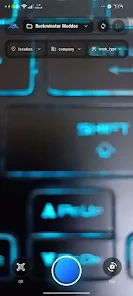
AVAMENT-CAM makes image capture straightforward by combining an in-app camera with batch upload controls, descriptive fields and classification options. Users tap a clear camera button to take photos, add a short description, choose a classification or defect type, and assign the image to an existing location or scan a QR label to create a new one. Navigation is driven by a simple breadcrumb-style location selector so teams can move from company to project to building and room without losing context. The interface emphasizes large touch targets for common actions, a consistent workflow for adding notes and tags, and quick filters to retrieve recent or critical images.
Project progression and structure
The app models project progression through configurable location hierarchies and status markers. Project administrators can define companies, sites and nested locations so every photo belongs to a clear place in the project structure; onsite users then progress through stages by tagging photos with work type, contractor, or inspection status. This creates a traceable timeline of work across levels, helping teams track milestones, handovers and punch-list completion. Filters and searches let managers view images by date, contractor, task or location, providing a practical progression dashboard without needing separate software.
Offline operation and synchronization
AVAMENT-CAM is built to work where connectivity is unreliable: photos and metadata are stored locally while offline and the app automatically synchronizes when a network becomes available. Automatic sync is designed to minimize lost work, batch data transfers to reduce mobile data usage, and preserve the order and context of entries so office teams receive coherent records. Some functions—such as sharing secure links or inviting external reviewers—require internet access and will complete once the device reconnects. The app also highlights pending sync items so users know what remains in local storage.
Secure sharing and access controls
The app provides controlled sharing options to distribute selected photos or galleries outside the app. Create time-limited links with optional passwords to ensure recipients only see intended material for a defined period. Access controls and project separation help maintain client confidentiality and allow teams to send staged reports without exposing unrelated site information. These sharing tools are intended for clear, auditable distribution rather than an open public feed.
Visual style, customization and replay value
Designed for legibility in bright sun or low light, the interface balances practical light and dark modes with readable typography and prominent image thumbnails. Customizable templates and classification sets allow teams to reuse consistent naming, defect categories and report formats across multiple projects, increasing the value of each capture over time. Because templates and hierarchies are portable, repeated site visits become faster: users apply familiar workflows, reuse saved filters, and build a searchable archive that improves efficiency on future inspections and maintenance cycles.
Accessibility and user experience
AVAMENT-CAM focuses on an uncluttered experience for field workers: large buttons for camera and save actions, minimal required fields to speed entry, and multi-language labels to support diverse crews. The app reduces cognitive load by guiding users through a steady capture-and-assign flow rather than forcing complex menus during site work. Where projects require more detailed notes, descriptive fields allow structured text and standard classifications so office teams can interpret entries without follow-up calls.
Use cases, advantages and practical limits
Common use cases include quality inspections, site progress logs, handover documentation and contractor verification. The app ensures consistent records by linking photos to location QR codes, speeds on-site reporting through batch capture and filters, and helps teams operate in low coverage areas through local storage and deferred sync. Practical limits include the need to install and maintain QR labels on site for precise tagging, the requirement of internet access for immediate sharing or centralized backups, and some initial setup time to configure companies, work types and the site hierarchy. With those considerations addressed, AVAMENT-CAM serves as a robust, easy-to-adopt field documentation solution that improves collaboration between field and office teams.