



Stuffrite puts you in control of your money by combining envelope-style budgeting with a forward-looking projection tool; with Stuffrite you can stop reacting to bank balance surprises and start planning purchases against a simulated future cash flow. This editor overview explains how Stuffrite organizes scheduled bills, virtual envelopes and automated transfers into a single, local-first experience so you can see weeks or months ahead, test what-if scenarios and keep sensitive data on your device.
Key features
The app centers on a few tightly integrated ideas: a Time Machine projection that rolls scheduled bills and your spending patterns into a forecast, modern virtual envelopes that assign every dollar a job, and automation helpers called Autopilot and Horizons that move money toward goals without constant manual transfers. Account Mirror Mode links envelopes to real bank balances so the app reflects live account behavior while Workspace Mode allows selective sharing of specific envelopes with a partner for joint budgeting. Privacy is a priority: your primary data stays local on your device and sync is limited to only the envelopes you choose to share.
How it works
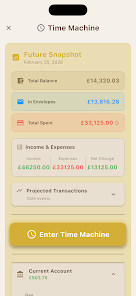
Stuffrite asks you to enter recurring bills, one-off expenses and the envelopes you want to fund. The Time Machine uses those entries to project future balances by simulating scheduled withdrawals and typical spending patterns. You can run scenarios to see how a proposed purchase or a new subscription would affect your balance in the coming weeks or months. Envelopes receive allocations from income as you schedule transfers, and projections update automatically so you can evaluate trade-offs before you spend.
Controls and user experience
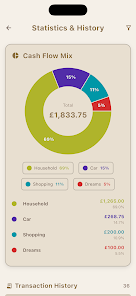
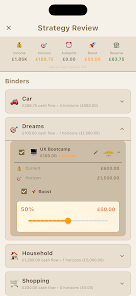
The interface keeps common tasks simple: tap to add a bill or envelope, drag to move funds between envelopes, swipe a transaction to mark it cleared, and pinch to zoom the forecast timeline. Visual cues such as color-coded envelopes and subtle progress bars show funding status at a glance, while inline charts present the projected balance curve without hiding details. Quick-entry fields reduce friction when logging cash spending and a compact mode helps you manage budgets comfortably on smaller screens.
Progression, goals and replay value
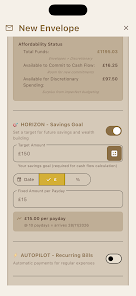
Rather than a game-like level system, Stuffrite offers a steady progression of financial milestones: funded envelopes, completed savings goals and multi-month forecasts that confirm stability. Horizons and Autopilot let you schedule gradual contributions so goals are reached over time without repeated manual transfers. The Time Machine encourages replay value by letting you run multiple scenarios—test different saving rates, move a bill date, or simulate irregular income—to learn which plan best preserves cash flow across several months.
Customization and visual design
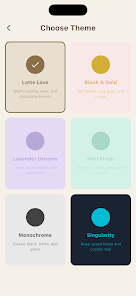
You can personalize envelope names, choose colors and icons, reorder categories and switch between a more visual or a condensed list view. The app favors a clean, modern aesthetic with high-contrast text, minimalist charts and an unobtrusive calendar timeline that surfaces upcoming bills. A light and dark theme makes the interface comfortable in different lighting, while adjustable font sizes and spacing options improve readability for different preferences.
Privacy, offline use and selective sync
Stuffrite is designed to be usable without constant connectivity: core budgeting, projections and data entry work offline because data is stored primarily on your device. When you choose to share an envelope through Workspace Mode, selected envelopes are synced with a partner so you can coordinate shared expenses without exposing the rest of your budgets. The app avoids ad-driven tracking and limits background data sharing to keep the surface area of externally transmitted information small.
Accessibility and device compatibility
The app includes accessibility considerations such as scalable text, contrast-aware color choices and logical focus order to work with screen readers. Touch targets are generous for comfortable tapping, and compact versus expanded layout options make it practical on phones and tablets. Because most operations are local, performance remains responsive on a wide range of modern Android devices.
Known limitations and sensible expectations
Projection accuracy depends on how complete and consistent the scheduled bills and habit data are; manually entered or irregular transactions can introduce variance. Account Mirror Mode mirrors real balances and may change how you interact with accounts, while Workspace Mode shares only the envelopes you designate so joint budgeting still needs coordination. Stuffrite is a planning and simulation tool and does not execute bank transfers for you.
Getting started
Begin by creating a few envelopes for rent, utilities and discretionary spending, add your recurring bills and run the Time Machine to view an initial forecast. Enable Autopilot or Horizons to automate contributions toward a target, and invite a partner to share specific envelopes if you need joint visibility. Over time you can refine categories, test alternate scenarios and use the projection reports to make steadier, more predictable financial choices with Stuffrite.






