
Key Food

| Package ID: | |
|---|---|
| Latest Version: | v1.0.0 |
| Latest update: | May 24, 2026 12:19:04 |
| Developer: | Key Food Stores Co-Op, Inc. |
| Requirements: | Android |
| Category: | Lifestyle |
| Size: | 51.15 MB |
| Tags: | Navigation Camera Date |
Rating :4.5
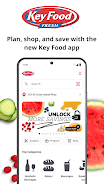
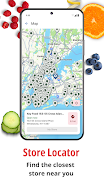
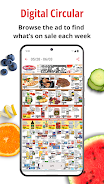
Key Food puts a neighborhood supermarket into a single app, helping you locate nearby stores, browse the current weekly circular and load digital coupons to your loyalty card before you check out. The Key Food app focuses on making grocery planning more predictable: view store hours and payment options, check item availability, build and organize shopping lists, and use a built-in barcode scanner for fast price checks while you shop. Whether you are preparing a weekly shop or picking up an ingredient for tonight's dinner, Key Food combines local deals and simple tools to reduce surprises at the register.
Key Features
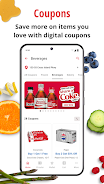
The app collects weekly circulars from participating stores and displays regional promotions tailored to the location you select. You can clip coupons directly in the app and load savings to your Loyalty Card so discounts are applied at checkout without paper coupons. A searchable product catalog helps you find brands and specific items across nearby family stores and shows whether an item is carried at the location you chose. The barcode scanner uses your device camera to instantly check prices and available offers for a scanned product, making it easy to compare in-aisle prices with the circular and your clipped coupons.
Store pages surface essential details such as address, hours, accepted payment methods and any store-specific notes. Inventory indicators and price information reflect what the app receives from the store; because availability and pricing are localized, selecting the correct store before browsing ensures you see accurate offers for that neighborhood. You can save favorite stores to speed up future visits and to receive a tailored list of weekly specials for the locations you visit most often.
Controls & Navigation
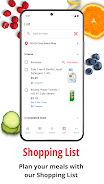
Key Food’s interface is designed for quick access while on the go: a persistent search field lets you find products and deals by name or barcode number, while filters narrow results by department or brand. Tap to clip coupons and a single button adds items to a shopping list. The barcode scanner is launched from the main screen and uses familiar camera controls; the app will prompt for camera permission on first use. Shopping lists support simple gestures such as tap to check off an item and long-press to edit quantities or move items between lists.
Progression & Rewards
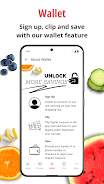
The app’s progression structure is centered on savings and convenience rather than gamified leveling. As you clip coupons and load deals to your Loyalty Card, you can track cumulative savings in the app so you see how offers translate into real dollars saved. Repeatedly using the same store and saving common items to lists helps the app surface relevant deals and shortcuts, improving the efficiency of each subsequent shopping trip. Note that the redemption of digital coupons requires linking or using your store Loyalty Card as indicated by the merchant.
Visual Style & Accessibility
The design emphasizes readable typography and clear category color coding so circulars and product pages are easy to scan in-store. Product images, when available, accompany listings to help identify items quickly. Key Food is built with accessibility in mind: text sizes and contrast are chosen for visibility, and the layout supports straightforward navigation for screen readers and one-handed use while shopping. Accessibility settings available on your device will work with the app to further adjust text scale or display contrast.
Customization & Shopping Lists
Shopping lists are flexible and persist between sessions so you can prepare weekly menus or set up quick grab lists for last-minute trips. Items can be sorted by department to match store layouts, and commonly purchased items can be marked as favorites for fast re-addition. The app allows multiple lists so you can maintain a family shopping list separately from special-occasion or pantry restock lists, helping you reuse and modify lists instead of recreating them each visit.
Offline Use & Data Considerations
Certain elements of the app such as previously saved shopping lists and clipped coupons that were loaded to your Loyalty Card will remain accessible without a network connection, but real-time price checks, up-to-date inventory and the latest circulars require connectivity to fetch current store data. The barcode scanner requires camera access; location permission is requested to show nearby stores and localized offers. Key Food respects device privacy settings and asks only for permissions necessary to provide the described functionality.
Limitations & Practical Tips
Some limitations are inherent to retailer systems: savings are tied to loading coupons to your Loyalty Card, offers vary by location and not every deal appears at every store, and you must select a specific store to view localized circulars and inventory. To get the best experience, pick your preferred store early in setup, clip coupons before you shop, and use the barcode scanner in-aisle to verify price and coupon applicability. If you encounter discrepancies, store customer service can confirm register pricing and coupon redemption rules. Key Food continues to receive updates to improve performance and local deal accuracy.






