
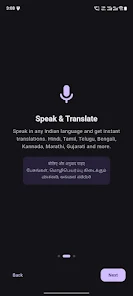

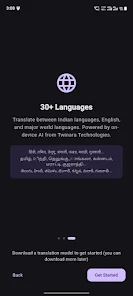

Twinara Translator is a privacy-first, on-device translation app that converts speech, text and photos without sending your data to the cloud. Built for people who need fast, private translations while traveling, learning or working across Indian and world languages, Twinara Translator runs fully offline after an initial setup so conversations and scanned images stay on the phone. The app combines voice recognition, optical character recognition (OCR) and text-to-speech into a compact tool for real-life communication where internet access is limited or privacy matters most.
Core features and modes
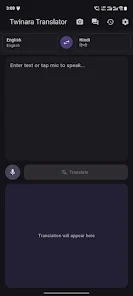
The app offers four main interaction modes: text translation, voice input, camera translate (OCR) and a two-person conversation mode. In text mode you can paste, type or import text and choose source and target languages; simple controls let you swap languages, edit the source text and view translation history. Voice mode processes spoken input locally using on-device recognition tuned for a range of Indian languages and major global languages, and you can control microphone sensitivity and pause or re-record as needed. Camera translate uses the phone camera to recognize printed text and overlay translations on-screen for menus, signs and documents. Conversation mode puts both speakers on a single device with an alternating-turn flow: press to speak or use auto-detect, and each participant hears the translation through the device speaker or headset with minimal delay.
Controls, customization and accessibility
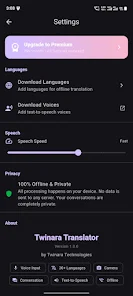
Controls are designed to be intuitive: large tappable buttons for mic and camera, language pickers with recent-language shortcuts, and in-line controls to adjust text size and copy results. Twinara Translator supports text-to-speech with several natural-sounding voices and adjustable playback speed so translations are easier to understand for learners and users with vision needs. Accessibility options include larger fonts, contrast-friendly themes and clear on-screen prompts for camera alignment. Offline operation also benefits users in low-connectivity environments, and settings let you manage downloaded language packs to save storage.
Offline setup and progression
After installation an initial setup step downloads on-device language models and assets needed for offline use; the size and number of downloads depend on which languages you choose. This setup functions as a progression path: start with a few core languages for a compact footprint and add additional language packs later as needed. Premium upgrades expand access to higher-quality AI translation models and unlock additional languages and features, letting users evolve their on-device capabilities over time without requiring continuous internet access.
Translation quality and limitations
Twinara Translator focuses on privacy-preserving, deterministic translations that perform well for everyday conversations, travel phrases and short documents. The app includes support for code-mixing like Hinglish and Tanglish, and recognition is tuned for common speech patterns in several Indian languages. As with any offline model, very long or highly specialized texts, rare dialects and heavy slang can challenge accuracy; for the highest-fidelity translations the Premium tier offers improved AI models. The description is upfront about these trade-offs so users can choose the right balance between privacy, convenience and translation quality.
User experience, replay value and workflow
The user experience centers on quick, repeatable tasks: scan a sign, dictate a question, or conduct a short two-way exchange. A searchable translation history doubles as a lightweight phrasebook so users can revisit recent translations and commonly used sentences, enhancing the app’s replay value for study and travel. Frequent actions are optimized with gestures and shortcuts: long-press to re-speak a translation, double-tap to copy, or pin important phrases to the top of history for easy access. This workflow design supports language learners who want to review prior interactions and travelers who need repeated access to the same phrases.
Visual style and device compatibility
The visual design is minimalist and focused on readability: clean type, high-contrast text overlays for camera results and a dark mode to reduce glare in low light. Controls are scaled for phones and larger displays so the same app works well on compact handsets and tablets. Twinara Translator aims to feel unobtrusive in real-world use, keeping the interface simple while exposing advanced options in settings for users who want fine-grained control over models and storage.
Privacy, pricing and support
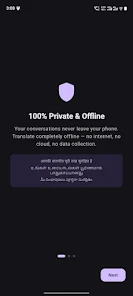
Privacy is a defining principle: translations run locally after the initial download, and the app does not send user speech or photos to cloud servers unless the user explicitly opts into a cloud feature. The free version provides basic offline translation with ads; a single Premium subscription tier removes ads, unlocks camera translate and conversation features across all supported languages and grants access to higher-quality AI models for a monthly fee. In-app help, FAQs and language troubleshooting tips are included so users can manage downloads, troubleshoot recognition issues and learn how to get the best results from on-device translation.
Known trade-offs
Some advanced capabilities are reserved for the Premium plan and offline use requires an initial download step that consumes storage. While the app supports 30+ languages and strong Indian language coverage, it does not include every global language and rare dialects may not be fully supported. Users who prioritize absolute cutting-edge accuracy in every domain may occasionally prefer cloud-based services, but for private, everyday translations Twinara Translator balances convenience, privacy and functionality in a compact on-device package.






