



Neo Clean is a compact cleaning utility that helps free up space on your phone. Neo Clean locates temporary files, caches, screenshots, large media, duplicates and leftover APKs. Neo Clean presents scan results so you can preview and selectively delete items, and it also displays basic battery information to monitor device health. The app is designed for users who want a straightforward, low-friction tool to reclaim storage and tidy up the file system without learning complicated settings or giving up fine-grained control over what is removed.
Key features and what they do
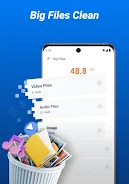
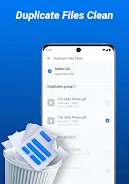
The junk cleaning function scans common locations for temporary files, app caches, ad files, logs and leftover installation packages, grouping findings by type so you can decide what to remove. Big files search lists media and downloads larger than a configurable size threshold so you can quickly spot space hogs. Screenshot detection finds recent and duplicate screenshots so you can clear out unneeded images while preserving important photos. Duplicate file detection highlights identical files and offers a preview so you can confirm before deletion. A lightweight battery info panel shows basic charge, temperature and status so you can monitor device health at a glance alongside storage tools.
How it works and user controls
Neo Clean runs scans that you start manually; a quick scan offers a fast overview, while a more detailed scan examines additional folders and file types. Results are presented in clear groups with simple on/off controls for each category and per-item checkboxes so you can preview files, view file sizes and paths, and exclude anything you want to keep. Deletion requires confirmation to avoid accidental removals. The interface focuses on direct controls rather than automated background processes, keeping battery and CPU impact minimal during use.
Progression, maintenance and replay value
There is no traditional gameplay progression, but Neo Clean encourages regular use by making routine maintenance quick and predictable: each successful cleanup reduces clutter and provides an immediate, measurable recovery of storage. Over time you can track how often particular file types accumulate and adjust your cleaning habits. Because scans are fast and selective, the app is useful as a repeatable maintenance tool for users who prefer manual control over automated cleaners.
Visual style and interface
The app adopts a simple, uncluttered visual design with clear typography and contrasting elements to make categories and action buttons easy to find. Clean lists and straightforward icons help users scan results visually and identify the largest items or most common junk types. The goal of the visual design is to minimize cognitive load so both new and experienced users can make safe choices quickly.
Customization and settings
Settings provide sensible defaults and a few customization options so you can tailor scans to your device. You can adjust file-size thresholds used by the big files search, choose which folders to include in deeper scans, and enable or disable specific detection categories. The app respects manual control over deletion and does not attempt to remove items without user consent. A privacy policy and in-app contact option are included for transparency and support inquiries.
Accessibility and device compatibility
Neo Clean aims to be accessible with readable text sizes and a high-contrast scheme for clarity. The interface uses large touch targets and simple gestures so cleanup actions work well on both phones and tablets. Because most operations are performed locally and on demand, the app is tolerant of limited connectivity and performs its core functions offline without relying on cloud services for scanning or basic battery reporting.
Limitations and intended audience
Neo Clean focuses on file cleanup and basic battery information rather than advanced system optimization or automatic scheduling. There are no background cleaning or automated scheduling features, so scans must be initiated by the user. Power users seeking deep system-level tuning or automated maintenance routines may prefer more feature-rich utilities, but users who want a lightweight, transparent tool for manual cleanup will appreciate the app's simplicity and predictable behavior.
Support and privacy
The app includes a privacy policy and in-app contact options so you can report issues or ask questions. Scans provide previews and require confirmation before deletion to protect important data, and the app explains which directories and file types are inspected. If you want a straightforward on-device cleaner that keeps controls in your hands, Neo Clean provides a practical balance of useful cleanup tools and simple battery information without unnecessary complexity.






