
Apps
Productivity
Resume Review
Resume Review
| Package ID: | |
|---|---|
| Latest Version: | v1.0 |
| Latest update: | Jun 18, 2026 12:17:03 |
| Developer: | Programmer World |
| Requirements: | Android |
| Category: | Productivity |
| Size: | 48.00 MB |
| Tags: | System Education Date |
Rating :4.5
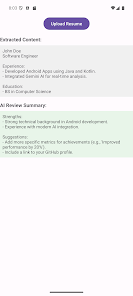
Resume Review helps job seekers improve their CV quickly by using AI to analyze resumes and deliver clear, actionable feedback. Resume Review accepts PDF and Word files and returns a concise summary of strengths, weaknesses and targeted suggestions you can apply right away. With Resume Review, both recent graduates polishing a first resume and experienced professionals updating profiles can speed up the revision process and focus on what recruiters notice most.
Key features
This app supports common resume formats so you can upload .pdf, .doc or .docx files without conversion hassles, and it preserves structured elements such as tables, dates and section headings. The engine performs deep content extraction that reads body text and structured data to surface achievements, job titles and timelines accurately. AI-powered insights group feedback into short, high-impact items that summarize strengths, pinpoint weaknesses and offer practical edits you can implement immediately. The interface is intentionally clean and readable, keeping the path from upload to improvement straightforward and quick.
How it works
Using Resume Review takes just a few simple steps: select or upload your document, wait briefly while the app parses the file and then review a clear breakdown of findings. Analysis is presented in sections that correspond to common resume components so you can see recommendations for the summary, experience descriptions, education and skills separately. The app highlights key phrases and formatting issues that commonly affect applicant tracking systems and recruiter impressions, and provides focused wording suggestions and structural tips rather than long, unfocused reports.
User experience and controls
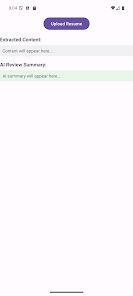
The workflow is designed for mobile and tablet use: tap to choose a file, confirm the upload and open the review screen to read the prioritized feedback. Recommendations are written for quick scanning with short action items so you can move from reading to editing without wading through dense text. Visual cues and readable typography emphasize what to change first, and contextual examples make it easy to see how an edit would improve clarity or impact. The app minimizes complexity so users spend less time learning controls and more time improving content.
Progression and revision workflow
Resume improvement is an iterative process and the app supports repeated reviews to help you refine wording and layout between job applications. After applying edits in your preferred editor, you can resubmit the updated file to check whether suggested issues were addressed and whether strengths have become more prominent. This stepwise approach makes it practical to focus on the highest-value changes first—such as clarifying accomplishments or aligning vocabulary to a target role—before tackling finer stylistic tweaks.
Design, accessibility and performance
The visual style favors clarity: consistent spacing, legible fonts and a neutral color scheme keep the interface accessible for a wide range of users. The app is built for quick responses on modern devices so most analyses complete in seconds; lengthy or highly complex documents may take a little longer to parse. Accessibility considerations include clear contrast and readable wording in recommendations so users with varying visual needs can navigate and act on feedback effectively.
Privacy and limitations
Resume Review processes documents with privacy in mind and focuses on delivering only the information needed to generate recommendations. Keep in mind that automated suggestions are meant to support decisions and may still require human judgment to match a specific role, tone or industry nuance. The app accepts PDF and Word documents only, so other file types will need conversion before upload. Highly specialized or niche industry terminology may not always be fully captured by general recommendations, so pairing the app with an expert review can yield the best final result.
Practical tips and typical use cases
For best results, submit a clean, text-based resume file rather than an image-only PDF or heavily designed layout that obscures text. Use the app to test different ways of phrasing accomplishments, to tighten descriptions for recruiter scanning and to remove passive language that weakens impact. Resume Review is useful when preparing targeted applications, refreshing a profile after a career break or quickly iterating multiple versions to match different job descriptions. It keeps the resume editing loop short so you can focus on applying with confidence.






