
Apps
Productivity
Everbet
Everbet

| Package ID: | |
|---|---|
| Latest Version: | v1.0.1 |
| Latest update: | Jun 18, 2026 09:18:05 |
| Developer: | Everything Jeeping, LLC |
| Requirements: | Android |
| Category: | Productivity |
| Size: | 17.00 MB |
| Tags: | System Navigation Date |
Rating :4.0
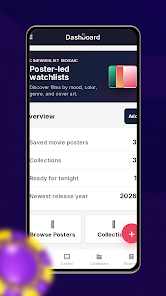
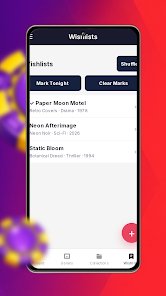
Everbet is a mobile web app designed to help movie fans build and manage watchlists, collect and organize posters, and track viewing habits from a single, easy-to-use interface. The app places a visual poster gallery, a compact dashboard and customizable collections side by side so you can browse ideas, prioritize what to watch next, and keep a simple history of what you’ve seen without switching between multiple tools. Everbet targets users who prefer a lightweight, browser-first experience for cataloging movies, curating thematic sets and exploring viewing trends.
Key features explained
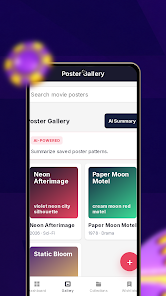
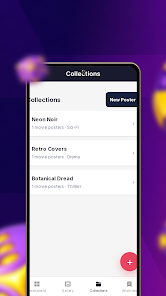
The poster gallery is the central visual space where you browse, save and arrange artwork; cards can be resized and reordered to match your display preference. A quick-actions dashboard surfaces common tasks — add to wishlist, mark as watched, or move to a prioritized queue — so list maintenance becomes a few taps instead of multiple screens. Collections let you group titles by theme, mood or project, and each collection stays searchable and filterable within the same web app. Analytics panels summarize activity over time with simple charts that compare frequency by day and highlight posters or collections that appear most often in your lists. An integrated AI chat assistant provides contextual suggestions and clarifying information to help refine lists and generate recommendation ideas based on your logged activity.
Controls and interaction model
Interaction in Everbet is optimized for touch and mouse-driven workflows: tap to open poster details, long-press or click-and-drag to rearrange items, and use inline edit fields to rename entries or add short notes. A robust search bar supports keyword and tag filtering so you can narrow results quickly, and bulk selection lets you perform common operations across many posters at once. Keyboard users will find that standard focus and navigation keys work across lists and dialogs, while mobile gestures are kept deliberately simple to suit smaller screens. The interface focuses on predictable behaviors rather than deep nested menus, making it straightforward for casual and power users alike.
Organization, progression and how your library evolves
Everbet helps you build a progressive catalog rather than a static list: as you add posters and mark viewings, the analytics dashboard begins to reflect your patterns and priorities. Progression is driven by activity — frequent entries generate visible trends, and collections can be rearranged into prioritized queues to surface the next titles you want to watch. Tagging and grouping help reduce friction as your library grows, shifting the app from a simple wishlist into a personalized discovery tool. Because the value of analytics improves with consistent logging, Everbet encourages light, regular updates rather than heavy upfront organization.
Visual style and customization
The visual design emphasizes posters and imagery while keeping UI chrome minimal so artwork remains the focal point. Gallery layouts can adapt between compact grid and masonry-like flows; poster thumbnails can be adjusted for density or visual emphasis. Basic theme options such as light and dark modes and adjustable thumbnail sizes let you tailor the display for different lighting conditions and screen sizes. Visual grouping is supported through collection headers and subtle badges so thematic sets stay easy to scan at a glance.
Analytics and the AI assistant
Analytics in Everbet are intentionally straightforward: frequency graphs, day-of-week patterns and comparisons between posters or collections provide quick insights into viewing behavior. These panels are oriented toward helping you make decisions — identify gaps in your watchlist, spot overrepresented genres, or simply see which items you return to most. The built-in AI chat assistant acts as a conversational helper that explains trends, suggests ways to prioritize lists, and offers contextual recommendations; it is a planning aid rather than an authoritative source, and its responses should be used alongside your own judgment.
Offline use, accessibility and known limitations
As a mobile web app,Everbet works in modern browsers and can cache recently visited pages for limited offline access, but full offline functionality and system-level push notifications are constrained by browser capabilities. Because certain native features are limited, some users may prefer a native app for deep offline or background syncing. Accessibility considerations are included in the design: clear focus indicators, readable type, and keyboard navigation reduce barriers for assistive technologies, and color contrast and layout choices aim to accommodate a range of users. Analytics usefulness depends on consistent activity logging; sparse libraries will naturally produce less detailed trends.
User experience and long-term value
Everbet is designed for steady use: adding a few posters after each viewing session, sorting new ideas into collections, and glancing at the dashboard once in a while produces better insight over time than large one-off updates. The app rewards regular curation by making it easier to prioritize and plan viewing choices, while the gallery approach preserves the visual appeal of posters so your catalog remains engaging. For users who want a single, browser-accessible tool to collect, organize and reflect on movies, Everbet offers a balanced blend of visual organization, lightweight analytics and conversational assistance without unnecessary complexity.






