

FinSwift

| Package ID: | |
|---|---|
| Latest Version: | v9.8 |
| Latest update: | May 27, 2026 17:14:03 |
| Developer: | Bimopro |
| Requirements: | Android |
| Category: | Finance |
| Size: | 44.00 MB |
| Tags: | Navigation Date Finance |
Rating :4.1
FinSwift is a finance app — a lightweight currency converter designed for quick, reliable conversions on the go. As a currency converter and calculator, FinSwift supports more than 170 world currencies and shows exchange results instantly as you type, making it useful for travelers, online shoppers, expatriates, and small business owners who need fast checks rather than full accounting or trading features. This description clarifies the app type (Finance / Currency Converter) and explains the interface, typical workflows, customization options, and practical limits so you know what to expect before installation.
Key features
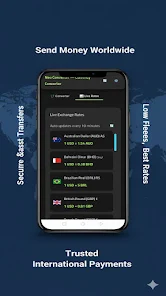
The core capability of FinSwift is real-time conversion across 170+ currencies with commonly used pairs available immediately. Rates are refreshed on a regular schedule when a network is available and the app caches recent rates so basic conversions remain accurate while offline. An integrated calculator accepts arithmetic expressions (for example adding fees or applying discounts) without switching apps. You can search currencies by name or country, recognize flags in the lookup view, and add frequently used pairs to a recent conversions area for fast recall. Number formatting is clear and consistent, with easy-to-read precision settings and a compact layout that keeps source amounts and results visible together to reduce entry mistakes.
Controls and typical workflow
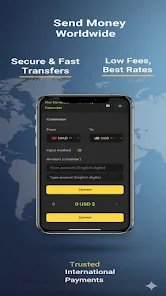
FinSwift emphasizes low-friction controls: an on-screen numeric keypad for rapid typing, a small expression field for combined arithmetic, and searchable lists for selecting source and target currencies. Swap controls allow reversing conversion direction with a single tap, and copy-to-clipboard makes it simple to paste results into messages, notes, or expense records. The app updates conversion results as you type, so you can enter a calculation like "12.50*1.07" and immediately see the converted total. The interface structure is intentionally shallow — select currencies, enter an amount, and view results — which helps when you need repeated short interactions throughout the day.
Customization, visuals and accessibility
Visually, FinSwift favors a minimal, high-contrast design that highlights numeric values and keeps clutter to a minimum. A night mode reduces screen glare and adjusts contrast for evening use. You can control the number of decimal places displayed when you need more precision or want a compact view, and toggle between compact and expanded display modes depending on screen size. Accessibility options include larger text for improved legibility, an orderly layout that works with screen magnifiers, and logical focus order for ease of navigation. These choices are intended to make conversions fast and reduce the chance of misreading figures.
Offline use, data and reliability
FinSwift stores the most recent exchange rates locally so you can still perform basic conversions with no connection; the app displays a timestamp to indicate when cached rates were last updated. When online, background refresh updates rates while limiting battery and data use; the app indicates whether a conversion used cached or live rates. The application is designed to be lightweight with modest storage and battery impact, and clear status indicators explain when network access is required for the newest rates. This behavior supports reliable use in airports, remote areas, or when traveling abroad with limited data.
Workflow improvements, progression and replay value
Rather than a complex progression system, FinSwift provides practical workflow features that save time across repeated tasks. A recent conversions list and the ability to pin frequently used currency pairs reduce repeated setup. The integrated calculator-style entry lets you chain simple operations to compute totals, taxes, or per-person splits directly within the conversion field, and the app remembers your last-used currencies to speed future conversions. These modest conveniences create genuine replay value for everyday users who frequently switch between currencies or perform quick arithmetic while shopping or reconciling small receipts.
Limitations and appropriate use
FinSwift is focused on quick conversions and straightforward arithmetic; it is not a trading platform, portfolio tracker, or accounting package. It does not execute trades or provide live trading execution, margin calculations, or tax advice. Rates are intended for estimation and convenience; users performing high-value transactions should confirm rates with their bank or official provider. The app is best used as a practical, lightweight tool for estimating amounts, comparing prices, and performing simple conversions when full financial software is unnecessary.






