
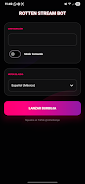
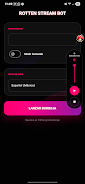

Rotten Stream Bot is a lightweight Android utility that reads live comments and interactions aloud while you stream or play games from your phone. The app turns chat activity into spoken notifications, announcing gifts, shares and new followers in real time so you can stay connected to your audience without needing to watch the screen. Rotten Stream Bot runs as an overlay or in a notification-bar mode, and it is designed to be simple to set up while remaining flexible enough for different streaming styles and levels of experience.
Key Features
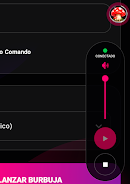
The core functionality centers on reliable, low-latency text-to-speech for live chat and interactions. Rotten Stream Bot captures chat events as they arrive and converts them into spoken messages; it also highlights special events like donations, shares, or follower alerts so you never miss important moments. The app provides a movable floating bubble overlay that can be positioned anywhere on the screen and a notification-bar mode that minimizes intrusion when you need maximum visibility for gameplay. Customizable commands let you map text triggers to spoken phrases or simple local actions (for example, responding to a chat command with a canned reply), and basic filters allow you to reduce noise from repetitive messages.
Controls and Interface
Controls are focused on one-handed convenience: tap the floating bubble to open a compact control panel, long-press to drag and reposition it, and use quick-access toggles to mute speech or switch modes while you play. A clear settings panel provides sliders for voice speed and volume, a switch for different TTS voices where supported by the system, and options to adjust font size and contrast for on-screen text. Notification permissions and overlay access are requested up front with simple prompts so you can finish setup and return to streaming quickly.
Customization and Personalization
Customization is a key part of the experience. You can define command keywords, set custom spoken responses, and save multiple presets for different streaming scenarios—for instance, a compact preset for competitive play and a more verbose preset for casual chats. Visual options include choosing between compact and expanded overlays, adjusting text appearance, and enabling or disabling animation. These settings let you tailor both the visual footprint and the audio behavior of the app to match your workflow and the demands of particular games or broadcasts.
Modes and Usage Scenarios
Rotten Stream Bot is useful in a variety of contexts: live mobile streams where you can’t constantly look at chat, recorded gameplay sessions where you want immediate spoken cues, and interactive broadcasts that benefit from audible acknowledgements of viewer actions. The app’s notification-bar mode is ideal when you want minimal distraction during fast-paced play, while the bubble overlay is better for interactive sessions that require occasional manual control. Although live chat obviously depends on an internet connection, core overlay and command processing operate locally so the app has a small runtime footprint and does not require continuous cloud access for its basic behaviors.
Accessibility and Performance
Accessibility features include adjustable voice rate, support for larger on-screen text, and a simple mute/unmute control to accommodate different hearing and attention needs. The app is optimized to preserve device performance: it uses modest CPU and memory while speaking chat messages and is tuned to run on a range of Android devices, including older models with limited resources. Background operation is managed to minimize battery impact so you can stream for longer sessions without excessive drain.
Reliability, Filtering and Safety
Reliability is emphasized through lightweight code and conservative background behavior so the app stays stable during extended use. Built-in filters let you ignore messages that match certain patterns or contain blacklisted words, reducing spam and off-topic chatter. Rotten Stream Bot operates independently and is not affiliated with any streaming platform; it requires standard permissions such as notification access and overlay permissions to function, and it provides clear prompts explaining why each permission is requested to help protect your privacy.
What to Expect
The free version of Rotten Stream Bot is ad-supported and does not require a subscription, making it easy to try the app without a financial commitment. Regular users can create and maintain command presets, switch interface modes for different games, and adapt audio settings to suit audience size and stream format. If you rely on audible chat cues while playing or streaming on mobile, Rotten Stream Bot provides a compact, configurable solution that keeps you informed and engaged with viewers while you focus on gameplay.






