
Apps
Productivity
BrushByte Odyssey
BrushByte Odyssey

| Package ID: | |
|---|---|
| Latest Version: | v1.0.0 |
| Latest update: | May 27, 2026 13:07:03 |
| Developer: | Crown Research LLC |
| Requirements: | Android |
| Category: | Productivity |
| Size: | 28.54 MB |
| Tags: | Travel Navigation Date |
Rating :4.5
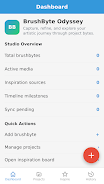
BrushByte Odyssey is a mobile web app built for visual artists who want a straightforward, organized way to manage drawing and painting projects from first concept through final polish. BrushByte Odyssey combines a central Dashboard, a Projects area with structured fields, an Inspiration Board to collect references, and a History view that records development over time, so you can keep creative momentum without juggling separate notes, images or files. The app is designed to work offline with automatic syncing when a connection is available, and interactive timelines visualize milestones so you can track progress at a glance.
Core workflow and interface
The core workflow in BrushByte Odyssey mirrors how many artists actually work: capture inspiration, define a project, iterate, and finalize. The Dashboard surfaces recent activity, project statistics and quick actions to open a sketch or add a reference image. Projects are organized into phases—concept, sketch, refinement and final—so each entry functions like a lightweight production plan. The interface prioritizes clarity: touch-friendly controls, clear typographic hierarchy and a minimal palette that keeps attention on your art rather than menus.
Controls and interaction
Controls are tuned for mobile web: tap to open projects, long-press to reveal contextual actions, and drag-and-drop to reorder items on the Inspiration Board or timeline. Image thumbnails can be pinched to zoom and swiped to browse references. Form fields for title, creation date, medium and palette use native inputs so you can type, paste or select quickly. These interaction patterns are chosen to feel familiar on phones and tablets without requiring a native install.
Project progression and milestones
Projects support a simple progression system: each entry can record milestones and checkpoints that appear on an interactive timeline. Milestones mark key moments like initial sketch completion, color testing or final review, letting you visualize how far a piece has come and estimate remaining work. The History view preserves snapshots of previous versions so you can compare earlier stages to the current state and learn from the evolution of a piece.
Customization and assets
BrushByte Odyssey lets you record palette colors, note inspiration sources and attach reference images per project. Palettes can be reused across projects, and a set of customizable project templates speeds setup for recurring workflows such as character studies, landscapes or commission work. You can tag projects with mediums and styles to filter and group your portfolio, and the Inspiration Board acts as a persistent moodboard you can curate over time.
Visual style and export options
The visual style emphasizes readability and unobtrusive controls so visuals remain front and center. Thumbnails, timelines and labels scale to different screen sizes while maintaining contrast for accessibility. While the app itself focuses on project management and reference organization rather than image editing, it supports saving and exporting project metadata and attached images so you can continue work in other applications or archive completed bodies of work.
Replay value and reuse
Replay value comes from reuse and iteration: templates, reusable palettes and saved inspiration collections make it easy to start new projects faster, revisit older series for new variations, or adapt past workflows for different commissions. The History and timeline tools encourage reflective practice by making developmental steps visible, so artists can return to past approaches and evolve them into new pieces.
User experience and accessibility
The app is designed to be approachable for a wide range of users, with clear labels, large tappable areas and support for browser zoom and text scaling. Color contrast and straightforward navigation help users with visual challenges. Because BrushByte Odyssey is a web app it benefits from standard browser accessibility features and can be used on devices with assistive tools and external keyboards where supported.
Offline work and syncing
Offline editing is a practical focus: you can create or update projects without a network connection and rely on automatic syncing when you return online. This makes BrushByte Odyssey useful for sketching on the go, working in travel situations or saving reference material in locations without reliable service. Syncing is designed to preserve the most recent local edits and to reconcile changes when connectivity is restored.
Practical considerations and limitations
BrushByte Odyssey is purpose-built for drawing and painting projects and intentionally keeps features focused on organization, reference management and progress tracking rather than full-featured image editing. As a mobile web app, it may lack some capabilities found in native editing suites, but it integrates naturally into a creative pipeline by storing the context and milestones that support actual studio work.






