
Willow tv

| Package ID: | |
|---|---|
| Latest Version: | v1.0 |
| Latest update: | May 27, 2026 12:11:05 |
| Developer: | EL HADI |
| Requirements: | Android |
| Category: | Tools |
| Size: | 10.00 MB |
| Tags: | System Navigation Read |
Rating :4.1
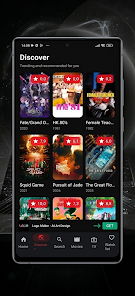
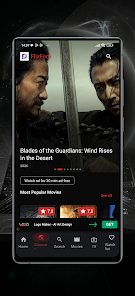
Willow tv helps you find movies and TV shows with less effort by focusing on discovery, curation, and quick previews so you spend more time watching and less time searching. The app surfaces popular titles and genre-based collections, offers short trailer previews to help you decide, and provides simple tools for building and organizing personal watchlists for movie nights with friends or family. Designed for viewers who want a streamlined decision-making experience, Willow tv puts recommendations and clear navigation at the center of the experience without pretending to be a full streaming platform.
Key features and browsing model
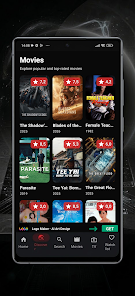
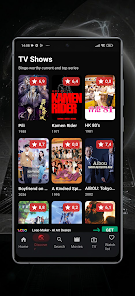
The browsing model centers on fast scanning and contextual lists rather than complex menus. You can move between trending picks, genre filters, and editorially curated collections to find content that matches a mood or theme. Trailer previews are short and load quickly so you can evaluate several options in sequence, and the interface highlights both high-visibility hits and lower-profile titles that could be interesting. Where available, metadata such as runtime, age guidance, and brief synopses appear alongside each title to make comparisons easier.
How search and selection work
Search supports multi-term queries and simple filtering so you can narrow by genre, decade, or specific attributes like mood or pacing. The app groups results into actionable rows—popular now, editor picks, similar titles—so you can decide whether to preview a trailer, add a title to a list, or save it as a recommendation for later. This design reduces friction when you are choosing between many options and helps you build a short shortlist for the evening.
Interface, controls, and visual style
Willow tv emphasizes a clean, minimal visual design that keeps imagery and text balanced: large cover art for quick recognition, compact metadata for fast scanning, and consistent touch controls for swipe, tap, and long-press actions. Navigation is optimized for single-handed use on phones, with clear back navigation and predictable gestures to preview, save, or remove items. Visual hierarchy is used to call attention to featured content without overwhelming the browsing screen.
Personalization and progression
Rather than offering a formal leveling system, the app progressively tailors recommendations based on your saved titles and browsing behavior. Over time the curated rows you see will reflect repeated interests and viewing patterns, creating an informal progression toward more relevant suggestions. You can also use simple preference controls to nudge recommendations—marking genres you prefer or excluding themes you don’t want—so the app’s discovery engine becomes more useful the more you interact with it.
Organization, customization, and watchlists
Watchlists in Willow tv are flexible and intended for practical use: create multiple lists for different occasions, reorder items manually, and add short notes to remind yourself why a title was saved. The app supports basic organizational tools so you can maintain separate lists for family-friendly picks, deep-dive films, or party-ready choices. These lists make planning easier and give you a place to store options for offline planning or group suggestions.
Replay value and challenge ideas
The replay value comes from the continual refresh of curated content and the satisfaction of discovering something unexpected. Although Willow tv does not include formal gamification, users can create personal viewing challenges—for example, watching a film from each decade or exploring a director’s early work—and use their watchlists to track progress. The app’s role is to supply fresh, rotating suggestions to keep those personal challenges interesting over time.
Accessibility, offline planning, and device behavior
Accessibility is built into the interface through legible typography, clear contrast, and large tap targets for core actions. Basic offline planning is supported by allowing you to view and manage your saved watchlists without an active connection, so you can prepare selections while commuting or when Wi-Fi is limited. The app does not replace a playback or streaming service; its focus is on discovery and organization, and it integrates metadata and links to sources rather than providing full viewing functionality itself.
Limitations and intended use
Willow tv is optimized for discovery and curation rather than replacing a dedicated streaming player. It emphasizes previewing and selection tools, so users who need advanced playback features, device-level casting, or in-app streaming may still need their regular streaming apps. The intent is to complement those services by simplifying choice, surfacing hidden gems, and making it straightforward to plan what to watch next.
For users who want a practical, low-friction way to find and organize entertainment, Willow tv delivers clear browsing, rapid previews, and straightforward list management to make movie nights and casual viewing decisions faster and more enjoyable.






