



Triple

| Package ID: | |
|---|---|
| Latest Version: | v1.3.1 |
| Latest update: | May 27, 2026 10:12:02 |
| Developer: | Eslam Fouad |
| Requirements: | Android |
| Category: | Finance |
| Size: | 42.42 MB |
| Tags: | System Navigation Finance |
Rating :4.0
Triple is a smart business management platform that helps small and mid-size organizations centralize employee records, track attendance, and simplify routine operations with minimal overhead. Triple combines a straightforward user interface with reporting tools that are designed for managers and HR teams, enabling staff oversight, time tracking and basic analytics in one place. The app is intended for teams that want to reduce repetitive administrative tasks while keeping tighter control over workflows and staff information.
Core functionality and how it works
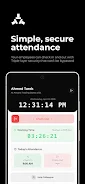
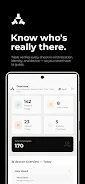
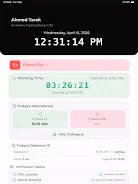
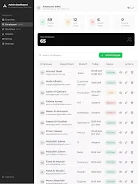
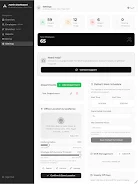
Triple organizes core HR and operational functions into clear modules: employee profiles, shift and attendance records, and a reporting area that surfaces common operational metrics. Each employee entry stores role, contact details and basic employment metadata so managers have one reference point. Attendance is recorded with simple time entries and presence markers that can be reviewed and corrected by authorized staff. The reporting interface aggregates these records into trend views and exportable summaries to help leaders spot absenteeism, bottlenecks and routine scheduling conflicts.
Controls and navigation
The app is designed around simple navigation patterns familiar to mobile and tablet users. Primary controls are accessible from a persistent menu that groups people, time, and reports. Within lists and profiles, quick actions allow edits, approvals and notes without deep menu diving. Forms use progressive disclosure so only the most relevant fields are shown upfront, while advanced fields remain available when needed. Touch-driven controls and clear labels reduce training time for users who are not specialized in HR software.
Onboarding, permissions and progression
Triple supports a staged onboarding process that allocates permissions by role so organizations can progressively enable features for supervisors, HR staff and administrators. New accounts can be seeded with template roles and default approval rules; administrators can then customize who edits employee records, who verifies attendance and who exports reports. This progression model helps teams start with basic functionality and enable more advanced reporting or audit capabilities as they gain comfort with the system.
Visual style and customization
The visual design emphasizes clarity: readable type, modest color accents to indicate status, and consistent spacing to make dense lists easier to scan. Administrators can adjust visible fields on profile pages and reorder columns in table views so each department sees the data it needs. Color-coding for presence status and simple icons for approvals create visual cues that reduce the time spent interpreting screens during busy shifts.
Module structure and workflow support
Triple groups functionality into logical modules rather than feature silos so teams move naturally from people to time to insights. Workflows for absence requests, shift approvals and corrections are captured within the appropriate module and recorded in an audit history. Managers can follow a simple approval queue to resolve exceptions and return corrected records to payroll or administrative staff for finalization.
Reporting, export and ongoing value
Reporting focuses on operational insights that help managers make better day-to-day decisions. Users can run built-in reports on attendance trends, late arrivals and departmental utilization, then export summaries in common formats for offline review or sharing with finance and payroll teams. That ongoing visibility makes Triple valuable beyond initial setup, as regular reporting highlights areas for process improvement and staffing adjustments.
Accessibility, offline use and reliability
Triple follows basic accessibility principles such as adjustable text size and clear contrast to support users with different needs. Where connectivity is intermittent, the app can cache recent records locally and synchronize changes when a connection is restored, allowing supervisors to continue basic checks offline. Regular data validation and simple conflict resolution controls help prevent accidental overwrites during sync operations.
Security, integration and limits
Triple uses role-based access and record-level permissions so sensitive employee details are visible only to authorized users, and audit trails capture changes for accountability. The app provides standard export options for sharing data with payroll or HR systems; organizations with specialized legacy platforms may need additional steps to align formats or import flows. Administrators should plan an initial setup period to map existing processes and train staff, and larger teams may require a phased rollout to adopt advanced reporting features fully.
Advantages and realistic expectations
Triple reduces manual work by consolidating employee management, attendance and operational reporting in one place, helping teams spend less time on administration and more on core activities. Its modular structure and permission model allow gradual adoption, and built-in reporting gives managers timely visibility into workforce patterns. Limitations to expect include an initial configuration period to fit unique company processes and a learning curve for sophisticated analytics. Organizations with complex legacy systems should anticipate some integration effort to align data formats and workflows.






