
Apps
Productivity
WhenSpace
WhenSpace

| Package ID: | |
|---|---|
| Latest Version: | v1.1.8 |
| Latest update: | May 26, 2026 17:14:04 |
| Developer: | Marcin Syngajewski |
| Requirements: | Android |
| Category: | Productivity |
| Size: | 22.00 MB |
| Tags: | Date |
Rating :4.1
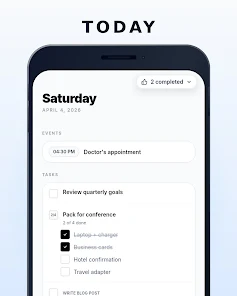
WhenSpace brings tasks, events and habits into a single uncluttered interface so you can open the app and immediately see what matters for the day. Instead of switching between calendars, habit trackers and scattered to‑do lists, this app surfaces a focused Today view with timed events, actionable items and habit check-ins, and it automatically surfaces overdue work so nothing slips through the cracks. If you want a calm, practical way to plan each day without juggling multiple tools, it offers a simple, consolidated workflow.
Key Features
⭐ WhenSpace's Today screen combines tasks, timed events and habit check-ins into one prioritized view so you always know what to focus on.
⭐ Overdue items rise to the top automatically so important work doesn't get lost in the list.
⭐ Three task types: quick check-offs for simple items, multi-item checklists, and step-by-step flows that reveal only the current step for larger projects.
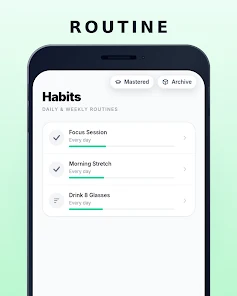
⭐ Habit tracking includes a visual progress bar aimed at long-term streaks and supports check-ins, counts and durations.
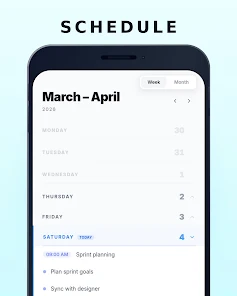
⭐ A compact 7-day week view and a sparse month overview show future commitments without clutter.
⭐ A Someday bucket holds undated ideas so you can defer planning without losing them.
Advantages
✅ WhenSpace reduces app switching by putting tasks, events and habits in a single interface.
✅ The prioritized Today view makes overdue and high-priority items immediately visible.
✅ Flexible task types adapt to quick chores, broken-down projects and multi-step workflows.
✅ Habit tools visualize progress toward longer-term consistency without adding noise to your day.
Disadvantages
❎ The app emphasizes a calm, minimal daily view, which may feel too light for users who need dense calendar analytics or advanced scheduling tools.
❎ The focus appears to be on individual workflows; team collaboration and shared project features are not a highlighted part of the design.
❎ The habit interface is streak-oriented, which might not match every user's motivation style.