



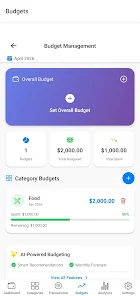

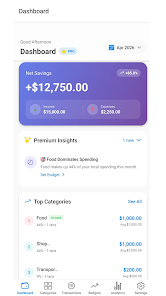
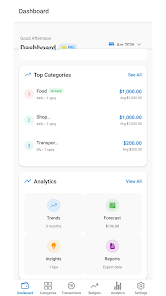
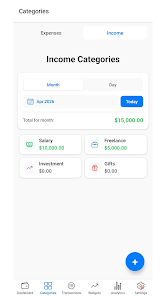

CoinWise is an intelligent expense tracker and personal finance companion designed to make everyday money management clearer and more actionable. CoinWise centralizes income entries, expense logging, receipt images and subscription tracking in one place while offering AI-driven insights to reveal patterns and suggest improvements. Whether you are balancing household bills, saving for a specific target, or organizing freelance cash flow, this app combines straightforward day-to-day controls with deeper analytic tools so you can plan, monitor and adjust your finances without complex spreadsheets.
Key Features
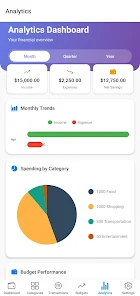
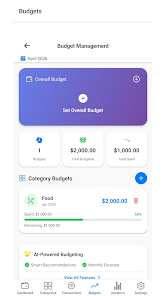
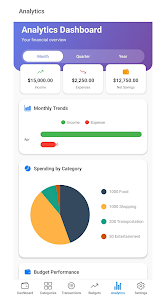
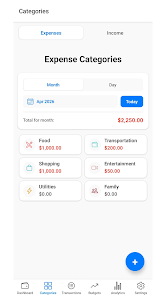
The app provides fast transaction logging with customizable categories and the ability to attach receipt photos for accurate records. Smart categorization and automatic subscription detection help reduce manual sorting, while predictive forecasts suggest expected monthly spending based on past trends. Budgeting tools let you create overall and category-specific limits with visual progress indicators and alerts before you exceed those thresholds. Savings goals can be set with deadlines and milestone notifications, and interactive analytics include income versus expense charts, category breakdowns, and monthly trend lines with exportable reports in CSV or PDF formats. Security options include biometric and PIN protection on-device and optional cloud backup and multi-device sync for premium users.
How CoinWise Works
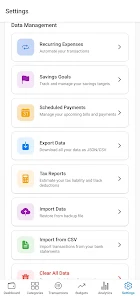
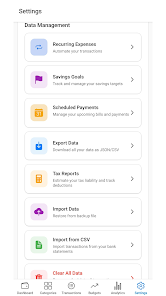
Entering transactions is simple: use quick-add buttons, templates for common expenses, or capture receipts with your camera and link them to entries. Edit, split or merge transactions with a few taps and use search filters to find past records by date, category or tag. The app is designed for efficient single-handed operation so adding daily items is fast, and a dedicated recurring schedule system helps you manage bills and automate reminders for subscriptions and payments. You can export your data to keep an offline archive or to review in spreadsheet software.
Progression and Motivation
Progression in CoinWise centers on goals and consistent habits rather than levels. Savings goals track progress with clear percentage bars and milestones that unlock motivating achievements and streaks to reward regular use. The AI-driven suggestions tailor advice to your history, recommending ways to shave recurring costs or accelerate a saving target. Free users get the core goal tracking and basic AI summaries, while premium subscribers gain access to expanded analytics, more detailed predictive tools and multi-device synchronization.
Visual Style and Analytics
The interface emphasizes clarity with color-coded categories, simple chart types and readable trend lines that reveal where money flows each month. Interactive charts allow you to tap into category details, adjust date ranges and compare periods side-by-side. Visual progress indicators and alerts make it easier to spot overspending before it becomes a problem, and exported reports preserve the same clarity for printing or sharing with financial advisors or accountants.
Customization, Replay Value and Controls
CoinWise supports extensive customization of categories, tags and budget settings so the app adapts to varied lifestyles and income structures. Templates for frequent transactions and adjustable reminder schedules reduce repetitive entry work, increasing the likelihood you'll keep consistent records. Replay value comes from habit formation: seeing progress, responding to AI recommendations and pursuing new goals keeps the experience fresh and useful over time without introducing unnecessary complexity.
Accessibility, Offline Use and Security
The app aims for an approachable user experience with clear typography, logical navigation and adjustable notification settings to suit different levels of engagement. Core functionality works offline with local storage of your entries, so you can add transactions and view recent reports without an internet connection; optional cloud backup and multi-device sync are available for premium users who want automatic device continuity. Security features like biometric unlocking, PIN protection and data export options provide control over privacy and backups.
Limitations and Transparency
Some advanced features are reserved for the premium tier: expanded analytics, unlimited categories for high-volume users, multi-device cloud sync and certain AI-driven predictive tools may be limited in the free version. CoinWise is built to give a useful free experience while offering upgrades for those who need deeper analysis or cross-device continuity. Try the base features first to confirm the app’s fit with your workflow and consider premium only if you want the extended toolset.
Overall, CoinWise focuses on making financial tracking practical and sustainable: easy entry, insightful visuals, goal-oriented progression and sensible privacy controls so you can spend less time managing records and more time making informed financial choices.