

Kidow is a family coordination app built to keep parents, caregivers and guardians on the same page about children’s schedules, pickups and arrivals. Kidow centralizes shared calendars, automates reminders for upcoming events and sends alerts when it’s time to leave so caregivers arrive on time; it also notifies family members when a child reaches a destination to reduce uncertainty during busy days. Designed for everyday logistics — from school runs and after-school lessons to playdates and babysitter handoffs — the app aims to replace chains of texts and missed calls with a single, reliable source of truth.
Key features and how they behave
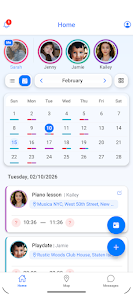
The shared family calendar lets multiple adults add, edit and view events, with support for recurring entries so routines can be scheduled once and reused. Automatic reminders are configurable per event: you can set reminder lead times, enable an optional prompt for when to leave based on travel time estimates, and choose which caregivers receive which notifications. The pickup assignment feature marks responsibility for each outing so there’s no ambiguity about who is collecting the child. Arrival alerts use location-based checks to send a confirmation when a designated place is reached, and the SOS function lets any family member trigger a one-tap request for help that is broadcast to the rest of the group.
How it works in daily use
Interaction in Kidow centers on simple, touch-friendly controls: tap to open and edit events, swipe to move quickly through dates, long press to access options, and use clear icons to assign pickup or mark attendance. Setting up a new family takes a short onboarding flow where the primary organizer invites other caregivers; permissions can be adjusted so each person only receives notifications relevant to their role. The app uses calendar sync to import personal schedules, and travel-time calculations help produce the “time to leave” prompts — this creates a lightweight progression system where families gradually build routines and reduce last-minute changes as recurring entries and templates accumulate.
Customization and progression
Kidow supports customization of notification types, reminder intervals and event categories so the app grows with your household. Caregivers can create templates for frequent events such as weekday school drop-offs, weekend practices or alternating custody handoffs, which speeds up scheduling and creates a history of recurring commitments. As families add more people and events, the interface surfaces the most relevant items first and offers simple filters to view a single child’s schedule or all upcoming pickups, making it easier to follow progress toward a more predictable daily rhythm.
Visual style and user experience
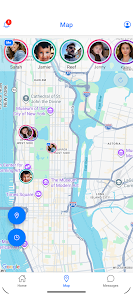
The interface favors clarity: readable type sizes, straightforward color coding for different children or event types, and a map view that provides a quick geographic snapshot of caregiver locations and destinations. Visual cues are designed to minimize cognitive load during hectic moments — clear labels for “Who’s Picking Up” and bold arrival confirmations help reduce errors. The app balances concise screens with drill-down detail so users see what matters at a glance and can tap for more information when needed.
Safety, privacy and accessibility
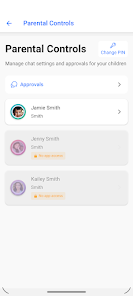
Kidow puts privacy controls in the hands of the family: location sharing and arrival notifications require explicit permission, and each member can pause location updates or adjust who sees what. The SOS feature is immediate and simple, intended to summon assistance from listed caregivers while preserving the ability to refine alert recipients. Accessibility considerations include support for larger text sizes, high-contrast themes and screen-reader compatibility so caregivers with differing needs can use the app reliably.
Offline behavior and limitations
Some Kidow features are available offline: cached calendars and recently viewed event details remain visible without a network connection so you can check schedules while on the go. Real-time functions such as live location, arrival detection and push notifications depend on connectivity and accurate device settings; poor signal or disabled location services will limit those capabilities. The system works best when all designated caregivers join and keep the app active, which is a practical requirement for full benefit.
Everyday scenarios and replay value
Families typically use Kidow daily for school runs, lesson pickups and coordinating childcare on busy evenings. Because the app saves templates and recurring patterns, repeat use becomes faster and more efficient over time, and the history of events helps parents spot patterns and adjust logistics. Kidow reduces the friction of coordinating multiple schedules, and its combination of calendar control, arrival confirmations and a simple SOS pathway gives caregivers a compact toolset for safer, calmer days.