









Concrete & Gravel Calc

| Package ID: | |
|---|---|
| Latest Version: | v1.0.2 |
| Latest update: | May 25, 2026 12:15:03 |
| Developer: | EckoByteStudios |
| Requirements: | Android |
| Category: | Tools |
| Size: | 63.11 MB |
| Tags: | Common Navigation Date |
Rating :4.0
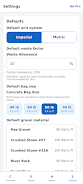
Concrete & Gravel Calc is a practical, jobsite-ready construction calculator designed to give contractors, builders and DIYers reliable material estimates without spreadsheets or guesswork. Concrete & Gravel Calc places volume and weight calculations for concrete slabs, footings, columns (sonotubes), walls and circular pads at your fingertips, and it also handles rectangular, circular and trench gravel calculations so you can size orders and budgets quickly. The app opens with simple prompts and unit toggles so you can start entering dimensions in Imperial or Metric right away, then apply an adjustable waste factor and view bag, volume and cost estimates immediately.
Core features
The app computes standard concrete shapes and common gravel forms with configurable parameters: length, width, depth, diameter, wall thickness and footing depth are accepted as direct inputs. You can switch between yards, cubic meters, tons and bags, and choose from preset bag sizes (40, 60 and 80 lb) and gravel density options such as crusher run, pea gravel and river rock to get weight and bag counts. Cost calculations accept unit prices per yard, ton or bag so you can compare vendor quotes. Saved calculations can be labeled for later review and reopened offline to adjust quantities as site conditions change.
How it works
Controls are straightforward: tap to enter numeric values, use the unit toggle to change between Metric and Imperial, and slide or type in a waste factor from 0–25% to reflect over-ordering for spillage or compaction. Results are presented immediately with breakdowns for total volume, number of bags, estimated weight and cost. The workflow is intentionally linear — enter dimensions, confirm material type and density, set waste and cost inputs, then save or export the result if you’ve upgraded to Pro. Saved entries act as reusable estimates you can reopen, adjust and apply to similar jobs so repetitive measurement tasks take less time.
User experience and visual design
Concrete & Gravel Calc was built with field use in mind: a clean layout, clear labels and large input fields reduce errors when working outdoors or with gloved hands. The interface emphasizes legibility and contrast, and control elements respond quickly to touch, which keeps measuring and ordering efficient. Accessibility considerations include scalable text and straightforward navigation to minimize training time for crews. Because the app works offline, you can perform calculations on a jobsite without network access and sync information later if you choose to record results on another device.
Accuracy, limitations and best practices
The calculator uses standard geometric formulas and common density presets to produce practical, planning-level estimates. Estimates are meant to guide orders and budgets — actual quantities can vary with material compaction, moisture content and supplier-specific blends, so Concrete & Gravel Calc recommends verifying volumes and weights with your material supplier before final ordering. Use the waste factor to roughly model over-ordering for uneven surfaces or cutting losses, and compare cost-per-unit options (yard, ton or bag) to select the most economical purchase method for your project size.
Workflow, reuse and productivity
Repeated use of labeled saved calculations makes the app increasingly valuable as you accumulate project templates: reopen a previous job, tweak a few dimensions, and get an updated material list in seconds. This reuse reduces time spent re-measuring and recalculating for routine tasks such as sidewalks, small foundations, footings and landscaping beds. The bag calculator and density presets simplify vendor conversations by translating volume into bags or tons, and the cost summary helps prioritize supplier quotes during procurement.
Upgrade and limits
The free version allows up to 20 saved calculations so you can try the app across several jobs; a one-time Pro upgrade removes ads, unlocks unlimited saved calculations and enables sharing results directly from the app. Concrete & Gravel Calc keeps the core calculators available offline in the free tier so you can continue planning without connectivity, while Pro is offered for users who want expanded storage and easier collaboration with teammates or suppliers. Remember that no calculator replaces on-site verification: treat estimates as a planning aid and confirm final quantities with your supplier or site measurements.