




Apps
Media & Video
AV Player
AV Player

| Package ID: | |
|---|---|
| Latest Version: | v1.0.3 |
| Latest update: | May 25, 2026 11:10:03 |
| Developer: | DuoStrick |
| Requirements: | Android |
| Category: | Media & Video |
| Size: | 51.23 MB |
| Tags: | Navigation Video Music |
Rating :4.0
AV Player is a lightweight, all-in-one media player for Android that opens common video and audio files quickly and reliably. AV Player supports HD, Full HD and 4K playback and a wide range of containers such as MP4, MKV and AVI while keeping a clean, modern interface designed for uninterrupted local playback. In everyday use AV Player focuses on smooth performance, fast file scanning and simple controls so you can watch a movie or listen to music without switching between multiple apps.
Playback capabilities and supported formats
AV Player handles a broad set of codecs and containers for both video and audio, including MP4, MKV, AVI, MOV, FLV, WMV and 3GP for video and MP3, AAC, WAV and FLAC for audio. The app makes use of hardware acceleration and optimized decoding when available on your device to reduce stutter and lower CPU load, which helps preserve battery life during long playback sessions. Subtitles are supported in common formats and can be adjusted for size, timing and placement so you can follow dialogue on any screen size.
Controls and user interaction
The interface emphasizes touch-friendly playback controls and gesture navigation: swipe up and down to adjust brightness and volume, swipe horizontally to seek, and tap to show or hide on-screen controls. AV Player also supports standard playback buttons, lock-screen controls and a persistent notification for background playback so you can control media while using other apps. These interactions are designed to be intuitive for both new users and people familiar with media players.
Library, organization and progression
Rather than relying on online accounts, AV Player focuses on local media management: smart folder browsing and automatic scanning help you build a local library without manual tagging. The app keeps track of recently played items and resume positions so you can pick up a long movie or audiobook where you left off. Basic playlists and playback queues allow simple progression through a series of files, useful for watching episodic content or listening to albums without interruption.
Visual style and on-screen layout
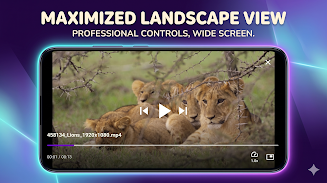
AV Player uses a minimal, modern visual design that keeps controls accessible without cluttering the viewing area. The UI scales cleanly across phones and tablets and adapts to landscape and portrait orientations. On-screen overlays for subtitles and playback status are kept subtle to preserve immersion. For devices that support it, the player makes use of hardware overlays for efficient rendering, which can improve playback smoothness on high-resolution videos.
Customization and accessibility
While AV Player emphasizes a straightforward interface, it includes options to customize subtitle appearance, playback speed and audio track selection so users can tailor playback to their preferences. Accessibility considerations include support for screen readers where available on the device and large, clear touch targets for core actions. The app’s gesture-based controls can be disabled or adjusted for users who prefer fixed buttons or have motor-control needs.
Offline play and reliability
AV Player is designed primarily for offline use: it plays files stored on your device or on external storage without requiring an internet connection. Fast file indexing and background scanning make it practical to navigate large media collections, and background playback lets audio continue while you switch to other apps. This offline-first approach keeps media private to your device and avoids dependence on network availability.
Performance, battery use and replay value
Because AV Player is lightweight and optimized for efficient decoding, it tends to conserve battery and perform well on a wide range of phones and tablets. Smooth playback, resume points and simple playlist features increase replay value for users who revisit series, movie collections or music libraries. The app is well suited to users who prefer a single reliable local player rather than multiple specialized apps.
Limitations and compatibility notes
AV Player does not currently include built-in cloud sync, online streaming services or advanced server-based library features; those functions are intentionally omitted to keep the app focused on local playback. Power-user library management and deep customization options may be less extensive compared with heavyweight desktop solutions, and specific codec behavior can vary depending on device hardware and Android version. Check compatible formats and hardware acceleration on your device if you rely on niche codecs.
Who this app is for
AV Player is a practical choice for users who want a single, reliable Android app to handle movies, offline videos and music with low overhead. It is especially useful when offline playback, subtitle control, smooth performance and simple library organization are the main priorities. If you need cloud sync or advanced media server features, those are not included, but for straightforward local playback AV Player offers a balanced mix of performance, usability and essential controls.