
TimeLoomX
| Package ID: | |
|---|---|
| Latest Version: | v1.1 |
| Latest update: | May 25, 2026 10:12:03 |
| Developer: | Parcerich |
| Requirements: | Android |
| Category: | Lifestyle |
| Size: | 11.00 MB |
| Tags: | Study Navigation Date |
Rating :4.1
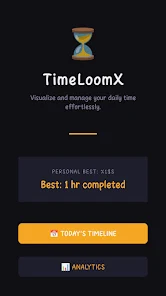
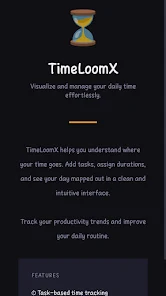
TimeLoomX is a lightweight, offline-first time tracking app that turns tasks and durations into a readable visual schedule so you can quickly understand where your hours go. TimeLoomX maps each day into a clear timeline or a bubble-style view, highlights productivity trends, and produces concise daily summaries so you can spot patterns without clutter or constant network access. Designed for people who want private, fast and simple tracking, TimeLoomX stores data locally using SharedPreferences and keeps the user experience focused on clarity and low resource use.
Core features
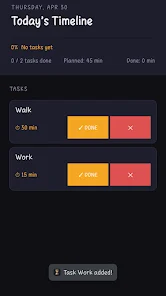
The central idea behind TimeLoomX is straightforward: add tasks, assign an expected duration, and watch how the day fills out. The app provides two complementary visualizations: a linear timeline for chronological context and a bubble view that emphasizes task density and duration. TimeLoomX records start and end times for entries so you can see exactly when activities occurred, and it compiles daily summaries and short-term productivity trends to help you make informed decisions about routine changes. All processing is done on-device to preserve privacy and responsiveness.
How it works and controls
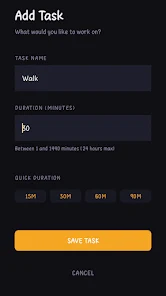
Interacting with TimeLoomX is designed to be direct and fast. To create a task you tap to add a new entry, choose or type a task name, and set the duration; durations are editable at any time. The timeline supports simple drag gestures to shift a task earlier or later in the day and pinch-to-zoom to focus on a shorter time window. The bubble view responds to taps to reveal task details and long press to edit or delete entries. Navigation between day, week and aggregated views is achieved with swipe gestures and toolbar controls so you can move between dates without interrupting an active session.
Progress and insight tools
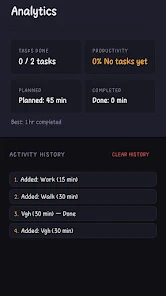
TimeLoomX’s summaries focus on helping you recognize trends rather than presenting raw logs. Daily summaries condense the day into a short snapshot of total focused time, interruptions, and unplanned tasks. Trend charts show recent patterns across days and weeks so you can observe whether focused time increases or where recurring gaps appear. Rather than built-in gamification, TimeLoomX supports natural progression by letting you compare past periods, set personal targets outside the app based on trends, and refine routines using the historical view to measure improvement over time.
Visual style and customization
The app adopts a clean, minimal visual style to reduce visual noise and make schedules readable at a glance. Timeline bars use proportional lengths to indicate duration while the bubble view sizes circles by time spent and arranges them to reduce overlap. You can assign custom labels to tasks, use color coding for categories such as work, study or personal, and adjust display density to show more or fewer details per screen. Accessibility options include adjustable font scaling and a high-contrast display mode to improve readability for diverse users.
Daily structure and typical use cases
Days in TimeLoomX are treated as the primary level of organization. Each day can be reviewed independently or compared across a week to reveal recurring patterns. Typical users include freelancers tracking billable blocks, students organizing study sessions, and anyone trying to reduce time leaks from low-value activities. Because the app is offline and stores data locally, it is well suited to people who prefer simple, private tools without background syncing or online dependencies.
Offline behavior, privacy and limitations
TimeLoomX runs entirely offline and persists data locally using SharedPreferences. This approach keeps the app lightweight and means records stay on your device, improving privacy and reducing permissions. The tradeoff is that there is no built-in cloud backup or multi-device synchronization, so users who need cross-device continuity should consider manual backup strategies outside the app. TimeLoomX prioritizes reliable, local performance over integrations and team collaboration features.
Performance and accessibility
Because the app avoids background services and remote syncing, it remains responsive on lower-end devices and conserves battery life. The compact data model minimizes storage impact and makes scans of recent activity quick. TimeLoomX also includes thoughtful touch targets and supports common accessibility settings on Android so people with different interaction needs can use the core features without friction.
What to expect
Expect a focused tool that visualizes daily time use, helps you identify where hours are spent, and supports deliberate habit changes through clear summaries and trend views. TimeLoomX does not attempt to replace full-featured project management suites; instead it offers a private, easy-to-read way to track your day and improve routine decisions over time.