
Apps
Media & Video
Video To GIf Maker
Video To GIf Maker
| Package ID: | |
|---|---|
| Latest Version: | v1.2 |
| Latest update: | May 25, 2026 10:12:03 |
| Developer: | yasser gold |
| Requirements: | Android |
| Category: | Media & Video |
| Size: | 27.00 MB |
| Tags: | Travel Camera Video |
Rating :4.2
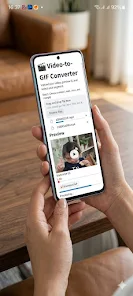
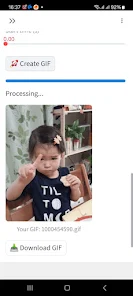
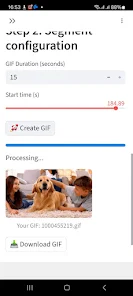
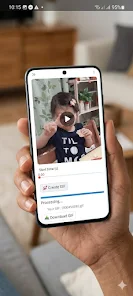
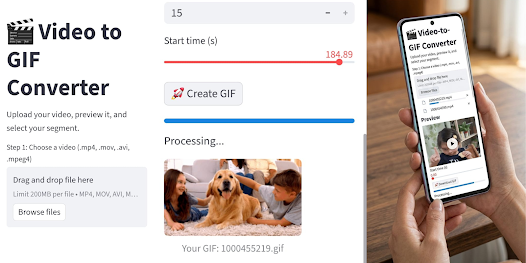
Video To GIf Maker is a compact and approachable Android utility that converts short clips into looping animated GIFs without the need for uploads or external services. Video To GIf Maker puts conversion tools and export controls on your device, so you can trim a moment, adjust playback speed, and export an optimized GIF in a few taps. The interface is designed for people who want quick social-ready loops as well as creators who need precise frame control, all handled locally for privacy and faster results.
Key features
This app combines fast local processing with practical editing tools. The conversion engine preserves visible detail while applying file-size optimizations so resulting GIFs remain smooth and shareable across social platforms. Use a timeline editor to scrub and select exact start and end points, step frame-by-frame to capture the perfect expression, and adjust frame rate and speed to create dramatic slow-motion loops or punchy quick reactions. The importer accepts common mobile and camera formats, so clips recorded on your phone can be loaded directly without format conversion steps. Export options include selectable resolutions and basic palette control so you can balance image quality and file weight depending on whether you plan to embed the GIF on a website or post it to messaging apps.
Advantages
Because all processing is performed on-device, the app minimizes exposure of your source videos to external servers and keeps conversion latency low. The codebase favors efficiency to reduce battery and memory impact, making it suitable for quick edits on the go. Core features are available at no cost and are supported by unobtrusive advertising, so casual users can create GIFs without committing to subscriptions. The app also emphasizes simple sharing: one-tap save to gallery and direct share flows to installed social and messaging apps streamline the workflow from edit to publish.
Disadvantages
The free version is ad-supported, which can interrupt longer editing sessions for some users. There is no automatic cloud backup or server-side sync for projects; because all work is local, you are responsible for exporting and managing backups if you want copies outside the device. Those requirements are a trade-off for privacy and offline capability.
Controls and workflow
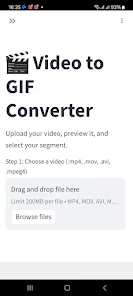
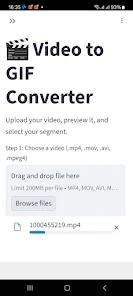
Workflow centers on an approachable timeline and a small set of manual controls. Tap to import, drag the trim handles to isolate the exact segment, and use frame-advance controls when you need single-frame accuracy. Speed sliders and frame-rate selectors are grouped on the export screen so you can preview loop behavior before saving. Common social presets are provided to simplify export choices, but you can also fine-tune bitrate-equivalent settings and resolution to suit different platforms. The design keeps the most-used controls visible while hiding advanced options behind a single additional menu to avoid clutter.
Output customization and presets
Export customization focuses on practical trade-offs between fidelity and file size. Choose resolution presets for mobile or web, select a target frame rate to reduce motion artifacts, and enable conservative palette reduction to shrink the file without creating excessive banding. If you frequently publish to the same destination, the app lets you reselect previous export parameters quickly so repetitive tasks become faster. Since everything is stored locally, saved presets travel with the app and do not require an online account.
Visual style and optimization
The app provides controls that help retain visual clarity in the constrained GIF format: options for limiting frame rate, reducing color palette intelligently, and applying light temporal smoothing to reduce flicker in rapid motion. These options make it easier to maintain readable visuals for small-screen viewers and help prevent overly large files when sharing over mobile networks. The preview window shows an accurate approximation of the exported GIF so adjustments can be made before committing to an export.
Accessibility and offline use
Video To GIf Maker is built to work offline and with minimal dependencies so edits can be made without a network connection. The interface uses clear icons and labeled controls, and timeline elements respond to touch gestures with pinch-to-zoom and drag support for accurate trimming. Processing is performed locally, which improves responsiveness for users with limited or metered connections and supports privacy-conscious workflows.
Practical tips and use cases
Use the app to prepare short reaction clips for messaging, create looping highlights from recorded gameplay, or turn camera moments into shareable GIFs for social posts. For best results, start with a clean short clip, trim close to the action, preview at different frame rates, and experiment with palette settings to find the right balance of detail and file size. Whether you need a quick meme or a polished looping clip for a story, Video To GIf Maker provides the tools to create, optimize, and share GIFs directly from your Android device.