

Stim Check is a lightweight utility that helps you track caffeine intake throughout the day and shows how much is still active in your body so you can make smarter choices about workout timing, daytime focus, and sleep. The app uses simple inputs—what you drank, how much, and your body weight—along with a compound half-life model to produce a real-time estimate of circulating caffeine. Whether you want to avoid late-night stimulation, time a pre-workout session, or reduce afternoon jitters, Stim Check gives clear, evidence-based guidance without unnecessary complexity.
How it works
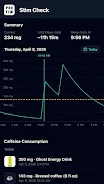
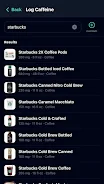
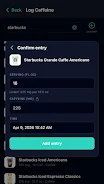
After a quick initial setup where you enter your body weight and preferred units, logging a beverage takes only a few taps. Choose a common preset like coffee, pre-workout, or an energy drink, or add a custom entry with a specified milligram amount. Stim Check converts your entries into an estimated blood concentration using an adjustable half-life parameter so the results better reflect individual metabolism. The main screen shows a time-charted caffeine curve that updates in real time as you log new items, and it highlights a “clear-by” window when estimated levels fall below a sleep-safe threshold.
Controls and interaction
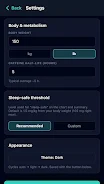
The user interface is intentionally minimal: large buttons for quick logging, an editable history list for reviewing or correcting past entries, and swipe gestures to remove recent logs. Tap an entry to edit dose or timestamp, or use the undo feature if you add something by mistake. Settings include a half-life slider and an option to set your personal sleep-sensitivity threshold, so the displayed clear-by time is meaningful for your habits. Stim Check is designed to minimize friction so tracking becomes a quick part of your daily routine.
Progression, history, and personalization
Stim Check is not a game, but it supports progression in the form of increasing awareness and better planning. Daily summaries and a week-view trend help you see patterns in intake, identify times when caffeine causes disruption, and adjust behavior over time. The app remembers common entries, so frequently consumed beverages appear as presets for even faster logging. Over weeks of use you can personalize the half-life and threshold settings to match your sensitivity, creating a more accurate personal model of stimulation and recovery.
Visual style and data presentation
The visual design emphasizes clarity: a smooth, color-coded caffeine curve plotted against the day’s timeline, clear labels for entry times and milligram amounts, and an explicit marker for the estimated clear-by time. A light and dark theme adapts to your device appearance and reduces eye strain at night. Graph elements are sized for readability on small screens and the layout keeps essential information visible at a glance so you can decide whether to have that afternoon coffee or skip it.
Level structure and session grouping
Entries are grouped by calendar day and by sessions such as morning, afternoon, and evening, making it easy to compare how different parts of the day influence your overall stimulation. The chart supports zooming into a selected period to inspect individual doses and their decay curves. This structure helps athletes, shift workers, and students plan discrete activities like training sessions, study blocks, or naps based on predicted caffeine levels.
Customization and accessibility
Customization options let you tailor Stim Check to your routine: set metric or imperial units, add custom beverage types with default milligram values, and fine-tune the half-life used for calculations. Accessibility features include scalable text, high-contrast color palettes, and a colorblind-friendly curve option so the visual data remains usable for a wide range of users. The interface is optimized for one-handed operation and large tappable areas to improve usability on smaller devices.
Offline use, privacy, and performance
Stim Check works offline and stores your logs locally so you can use it when you don’t have a network connection. The app is designed to be lightweight on battery and data, with simple local charts rather than heavy cloud syncing by default. Your entries remain on your device unless you choose to back them up or export; the app does not require account creation to function for basic tracking needs.
Limitations and beta notes
Stim Check is currently in public beta, which means you may encounter minor bugs or missing features as the app evolves. The app focuses on common caffeine sources like coffee, pre-workout formulas, and energy drinks and may not account for every intake source or individualized pharmacokinetics. The estimates provided are intended as guidance and should not replace medical advice. We recommend using Stim Check as a practical planning tool to reduce unwanted sleep disruption and make caffeine timing more predictable.
Stim Check combines a simple logging flow, clear visual feedback, and adjustable personal settings to help you track stimulation across the day. With straightforward controls, meaningful history and trends, and accessible visuals, the app aims to make caffeine management practical and unobtrusive for everyday use.






