


Apps
Productivity
SaidRight
SaidRight

| Package ID: | |
|---|---|
| Latest Version: | v1.0.0 |
| Latest update: | May 24, 2026 13:09:03 |
| Developer: | PalmApps Studio |
| Requirements: | Android |
| Category: | Productivity |
| Size: | 52.49 MB |
| Tags: | Social Navigation Date |
Rating :4.3
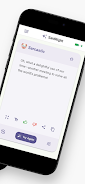
SaidRight is an AI writing assistant designed to help you rewrite messages into the right tone for any situation. SaidRight converts a rough draft, a copied text, or a short prompt into polished alternatives—whether you need a concise professional email, a friendly chat reply, a persuasive pitch, or a personal note. Paste or type your text, pick a tone, and the app returns refined options quickly, helping you avoid awkward phrasing and saving time on routine edits.
How it works and controls
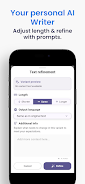
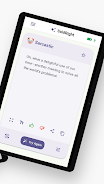
The interface emphasizes simple controls: a single input field accepts typed text or pasted content, while a tone selector lets you choose from preset styles. Use the generate button to produce up to three variants at once so you can compare options side by side. If you prefer more precise output, the refinement panel offers sliders and fields to adjust length, emphasize formality, or append extra instructions for context. Everything is designed for quick keyboard access and minimal clicks: select text, choose a tone, tweak a parameter, and apply the rewrite in seconds.
Tone library and customization
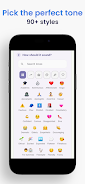
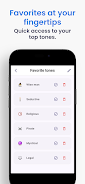
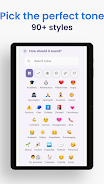
SaidRight ships with a large library of predefined tones to cover common needs across professional and informal writing. The catalog includes more than ninety tones spanning legal, technical, friendly, persuasive, poetic, and discreetly flirtatious options for appropriate adult contexts. You can save frequently used tones to a favorites list for faster access, organize tones by use case, and synchronize those preferences across devices. Instead of starting from scratch each time, reuse refined styles and tweak them with targeted instructions to match your voice.
Progression and learning
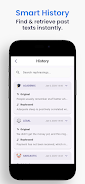
The app supports a natural progression in writing skill and workflow efficiency: early use focuses on practical rewrites and grammar fixes, while repeated editing helps you learn preferred phrasing and tone patterns. Keeping a history of past rewrites makes it easy to review improvements and restore earlier versions, and the tone comparator highlights specific changes between variants so you can learn why one option works better. Over time, users build a palette of favorite tones and instructions that speed up composition and make consistent messaging across projects effortless.
Translation and multilingual support
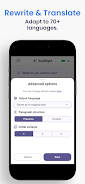
Integrated translation lets you preserve tone while converting text into more than seventy languages. That makes the app useful for cross-border emails, multilingual social posts, and communication with international colleagues or classmates. When translating, the system maintains the selected tone and adjusts phrasing to fit cultural norms, giving you usable drafts across languages that you can refine further if specialized terminology is needed.
User experience, visual style, and accessibility
The visual design favors clarity: a clean workspace with readable typography, clear labels for tones and actions, and a comparator view that places generated variants next to the original text. Accessibility considerations include scalable text sizes, high-contrast UI options, and logical focus order for keyboard navigation so users with different needs can work comfortably. The app also displays concise hints and example tones to guide newcomers through the most common transformations.
Typical workflows and replay value
SaidRight fits into many daily workflows—drafting client proposals, polishing student assignments, refining social media posts, or composing sensitive replies. Replay value comes from iterative editing: generate variants, select the best candidate, refine it further, and save that pattern as a favorite. This loop turns occasional fixes into a repeatable process that reduces drafting time while improving consistency across communications.
Limitations and practical considerations
While SaidRight handles a broad range of tones and corrections, AI-generated text can sometimes miss subtle context or legal and academic precision. Outputs may need manual review for specialized fields, and variant generation is currently limited to three alternatives per request. For best results, use clear prompts and review history entries to refine the app’s behavior to your needs. The app performs best with an active internet connection so it can access the latest language models and translation resources.






