








HearBox Mobile is a compact hearing-screening app that runs entirely on your phone and does not require headphones or extra equipment. Designed for quick self-checks in a quiet place, HearBox Mobile guides users through short, structured screening sessions that take only a few minutes and are suitable for people of any age. The app is intended for early detection and routine monitoring of hearing changes; results are indicative and should be confirmed by a professional when needed.
Key features
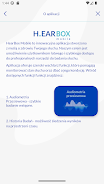
HearBox Mobile offers two dedicated screening modes, one designed for adults and one tailored to children, so the test flow and on-screen prompts match different attention spans and response styles. Each screening covers a set of common test frequencies and stimulus intensities, and the app stores a history of performed tests so you can compare results over time. Multiple patient profiles make it practical to manage tests for household members or clinical patients, and the results are presented clearly with visual summaries to simplify interpretation.
How the screening works
The core screening mechanics use brief tone stimuli presented through the device's built-in speaker across several standard frequencies. Tests are structured into short sequences: a brief calibration check and then a series of tone presentations at descending or ascending intensities to estimate a screening threshold. Users respond to heard tones using a single, easy control on the screen. The app records responses and calculates a pass/fail indicator for each frequency as well as an overall screening result, which helps identify patterns that may require follow-up.
Controls and test flow
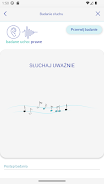
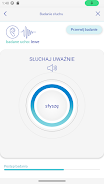
Controls are intentionally simple to reduce user error. During a test you will be prompted to increase your device volume to a recommended level and to remain in a quiet environment; then you tap the on-screen button whenever you hear a tone. Child mode replaces some prompts with friendly visuals and slower pacing to keep young users engaged while reducing false negatives due to inattention. Each session includes clear on-screen instructions, approximate test duration, and an automatic transition between frequencies so users do not need to manage complex settings during the test.
Progression, results and replay value
Rather than levels or scores, progression in HearBox Mobile is reflected by longitudinal tracking: repeated screenings create a timeline you can review to see gradual changes in hearing sensitivity. The app encourages periodic replay of the same test sequence to build a reliable history; built-in comparison views make it easy to spot small shifts between tests. This approach gives users a practical incentive to retest at set intervals and helps clinicians or caregivers observe trends without requiring continuous monitoring.
Visual style and customization
The interface focuses on clarity and legibility with simple layouts, large controls, and contrast-conscious color choices to suit a broad range of users. Visual summaries include straightforward charts and labeled pass/fail indicators rather than complex audiograms, and profile settings let you name each patient, set birth year, and choose preferred test pacing. While the app keeps controls minimal to avoid confusion, these small customization options help adapt the screening experience for different ages and attention levels.
Accessibility, offline use and privacy
Accessibility considerations include readable text sizes, clear icons, and an option for child-oriented visuals to reduce confusion for younger users. HearBox Mobile runs entirely on-device and does not require an internet connection to perform screenings, which preserves privacy and makes it convenient for home or remote settings. Test data are stored locally within the app under each patient profile so users remain in control of their records.
Limitations and recommended use
While HearBox Mobile is a useful tool for initial screening and routine monitoring, it is not a diagnostic instrument and cannot replace a full audiological evaluation. Accurate screening depends on a quiet environment; background noise and device volume settings can affect results. If a test indicates possible hearing loss or if you have concerns about persistent symptoms, consult an audiologist or ear nose and throat specialist for comprehensive testing and professional advice.
Whether you are checking hearing for yourself, tracking changes for a family member, or using it as a quick clinical screening aid, HearBox Mobile provides a convenient, on-device solution to perform regular hearing checks and build an actionable history of results. Its simple controls, structured test sequences and profile-based tracking make it a practical option for routine monitoring and early detection of hearing changes.






