
Apps
Productivity
Note Nest
Note Nest
| Package ID: | |
|---|---|
| Latest Version: | v1.0 |
| Latest update: | May 24, 2026 10:19:03 |
| Developer: | Dungkalios |
| Requirements: | Android |
| Category: | Productivity |
| Size: | 49.00 MB |
| Tags: | Life Common System |
Rating :4.1
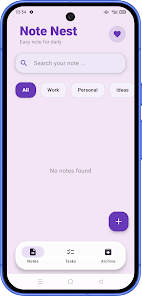
Note Nest is a lightweight note-taking app designed to help you capture daily notes, ideas, and simple task lists in one tidy place. Note Nest opens to a calm, colorful card-style interface that makes it easy to scan and organize short items whether you are planning a workday, saving personal reminders, or jotting quick ideas on the go. The app focuses on fast capture and clear retrieval: create a note, assign it a category, add checklist items if needed, and decide whether to pin or archive it for later reference. This straightforward flow keeps your main view uncluttered while keeping important items reachable.
Key features and mechanics
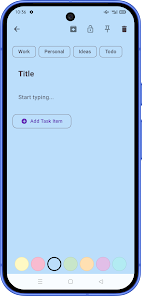
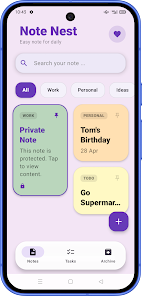
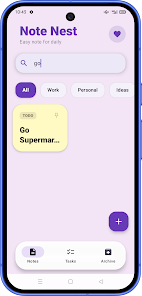
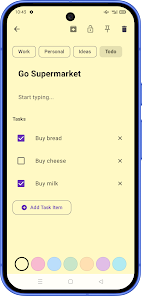
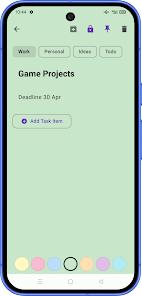
The core mechanics of Note Nest center on rapid entry and lightweight organization. Notes are created with a single tap, edited inline, and can contain simple checklist-style tasks that help you track small progress steps. A built-in search helps you find content by keyword or phrase, and the category system groups related notes into familiar buckets such as Work, Personal, Ideas, and Todo. Pinning promotes a note to the top of the view so it remains visible, and archiving moves finished or reference items out of your active workspace without deleting them. Selected notes can also be protected with an optional passcode to keep private content secure.
Controls and day-to-day interaction
Note Nest keeps controls intentionally simple so the app feels responsive and low-friction. Most actions are tap-based: tap a note to open and edit it, tap a checkbox to mark a task done, and use icons to pin or archive. Common gestures, like swiping a card to archive or long-pressing to reveal quick options, are supported where they speed up common tasks. The design favors quick capture: add a title, a few lines of content, and checklist items without navigating deep menus. This control model makes Note Nest practical for morning planning, quick idea capture, and managing small to-do lists throughout the day.
Progression and organization
There is no complicated hierarchy to learn: progression in Note Nest is about how notes move through your workflow. A typical progression starts with capture, then assignment to a category, followed by short-term action tracked with checklists, and finally either pinning for ongoing visibility or archiving for later reference. This simple lifecycle helps you keep the active workspace focused while preserving context for archived ideas. Because the app emphasizes clarity over complexity, it suits users who prefer an approachable system that supports daily routines rather than full project management features.
Visual style and customization
Visually, Note Nest uses colorful cards and a calm palette that make lists and ideas easy to scan at a glance. Cards vary in size depending on content, and color accents help group related notes visually. Customization options are deliberately modest to preserve the app's lightweight character: choose between a compact list or wider card grid, adjust text size for readability, and enable a dark theme if preferred. These visual choices are intended to reduce visual clutter and make long sessions of note review and checklist completion more comfortable.
Accessibility, offline use, and reliability
Note Nest is built to work smoothly when you need it most. The app functions locally on your device, so creating and viewing notes remains fast even without a network connection. Accessibility features focus on legibility and simple controls: adjustable font sizes, clear contrast in the card design, and a streamlined interface that works well with common screen reader tools. Because the app stays lightweight and avoids heavy background processes, it conserves battery and responds quickly during everyday use.
Who this app suits and what to expect
Note Nest suits users who want a focused, reliable place to collect thoughts and small tasks without the overhead of complex productivity suites. You will appreciate the clean layout if your workflow is driven by short notes, quick lists, and simple categorization. The trade-off is that Note Nest does not aim to replace advanced project-management tools or offer extensive multimedia editing: it intentionally keeps formatting and heavyweight features minimal to preserve speed and simplicity. If you value straightforward capture, easy retrieval, and a calm visual approach, Note Nest offers a practical companion for everyday planning and reminders.






