
SV File Manager

| Package ID: | |
|---|---|
| Latest Version: | v2.5.2 |
| Latest update: | May 22, 2026 10:14:06 |
| Developer: | SVC Studio |
| Requirements: | Android |
| Category: | Tools |
| Size: | 6.49 MB |
| Tags: | Navigation Photo Video |
Rating :4.3
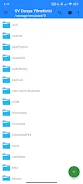
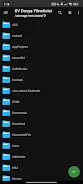
SV File Manager is a full-featured file management app for Android that helps you browse, organize and protect files on your device with a fast, secure and material-style interface. It puts common tools—file browsing, instant search, bulk operations and a recoverable trash—within easy reach, while offering media playback, document viewing, archive handling and AES-256 encryption for private data. Whether you need a simple explorer for photos and downloads or a powerful utility to manage APKs, archives and documents, SV File Manager delivers flexible tools and customization to keep your files organized and accessible.
Key Features
⭐ Browse and manage internal storage with create, rename, move, share and delete actions, plus instant search and list or card views.
⭐ Safe trash keeps deleted files recoverable with one-tap restore or permanently removable when you choose.
⭐ Built-in music player supports album art and metadata, with shuffle, repeat and background playback.
⭐ Video player powered by ExoPlayer for MP4, MKV and WebM, with swipe seeking and full-screen support.
⭐ Image viewer with pinch-to-zoom and quick options to set photos as home or lock screen wallpaper.
⭐ PDF viewer with page-to-PNG conversion, text/HTML editor, ZIP compression/extraction and APK management tools.
Advantages
✅ SV File Manager is lightweight and ad-free, presented in a clean Material Design interface for smooth navigation.
✅ Strong privacy features include AES-256 encryption so you can password-protect sensitive files.
✅ Integrated utilities—media players, document tools, archiver and APK manager—mean fewer separate apps to install.
✅ Extensive customization options and native support for 13 languages help adapt the app to your preferences.
Disadvantages
❎ The variety of tools and settings can be overwhelming for users who prefer a minimal, single-purpose explorer.
❎ Video support lists MP4, MKV and WebM; less common codecs or container formats may require external players.
❎ The app emphasizes local device management; cloud sync or remote storage integrations are not highlighted in the feature list.






