

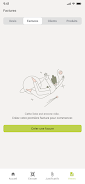

Auria Expertise is a collaborative accounting application built to centralize financial records and simplify communication between business owners and their accounting firm. Auria Expertise brings invoices, tax files and threaded messages together in a single secure workspace accessible from desktop browsers, tablets and smartphones, so teams can reduce administrative friction and work from the same up-to-date information. The app is designed to be used throughout the financial cycle: capture documents, monitor cash flow, and exchange structured requests with your accountant without resorting to scattered email chains or local folders.
Key features
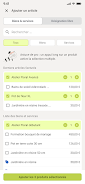
The core functionality focuses on fast document capture and dependable recordkeeping. Users can create new entries by photographing receipts and invoices with a device camera or by importing supplier PDFs through an attach-and-upload flow. Files are stored with metadata—dates, supplier names and categories—so you can filter and retrieve records during month-end or year-end closings. Simple charting tools display revenue and expense trends with adjustable date ranges and category filters to highlight cash flow patterns. A dedicated messaging thread per client or project keeps related documents, notes and task requests together so each query is traceable and attachments remain linked to the right conversation. Automation routines reduce repetitive work by suggesting document classifications and issuing reminder prompts for missing items.
How it works
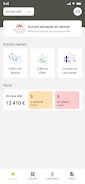
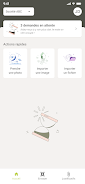
Onboarding is managed by your accounting firm: your chartered accountant creates the shared workspace, assigns roles and grants data access. From the user side, controls are intentionally straightforward—tap the camera icon to capture a document, use the guided import to add PDFs, or drag files into the web interface. The dashboard groups recent activity, unread messages and pending approvals so priorities are visible at a glance. Notifications alert you to new requests and approvals, and message threads associate documents with specific tasks to prevent miscommunication. Auria Expertise supports role-based permissions so administrators control who can view, edit or approve records within each folder.
Progression and workflow
The app is built around common accounting rhythms rather than forcing new processes: most companies begin by clearing a backlog of invoices and tagging them to the correct accounting period; after that, monthly cycles become routine with steady synchronization. Progression is task-oriented—submit receipts, confirm reconciliations and prepare files for tax filing—so each step has clear ownership and status indicators. Workflows can be adapted by your accountant to match local reporting needs, and real-world progression improves when both the firm and the business commit to consistent habits, which shortens review loops and reduces correction cycles.
Controls and user experience
Controls emphasize speed and clarity. Mobile controls use familiar gestures and large touch targets: a single tap opens the camera capture interface, swipes move between documents, and simple menus let you assign categories or attach notes. The web interface supports drag-and-drop uploads and contextual right-click actions for quick edits. These interaction patterns lower the learning curve for teams who manage accounting tasks intermittently and prefer concise actions over deeply nested menus. Inline help and tooltips guide new users through common tasks, while an activity log gives administrators an audit trail of who changed what and when.
Visual design, customization and accessibility
The visual design emphasizes legibility: dashboards present concise charts and lists, document previews are large enough to validate content at a glance, and action buttons use clear verbs. Color and contrast choices prioritize readability for international audiences, and basic accessibility options allow larger text sizes and simplified layouts for smaller screens. Administrators can configure workspace folders and reporting views to match company structure, and display settings let users choose compact or expanded layouts to suit different workflows, improving comfort for frequent or intermittent users alike.
Security, compliance and offline considerations
Data residency and regulatory compliance are central to the service: the platform is hosted in France and designed to meet relevant confidentiality and tax recordkeeping standards. Access controls restrict viewing and editing rights, encrypted connections protect data in transit, and audit logs support review processes. The app requires an online connection for synchronization and secure access; captured images and drafts may be held locally on the device until a connection is available, but final synchronization and access control checks happen when online to preserve security and compliance.
Limitations and practical requirements
While Auria Expertise streamlines many routine bookkeeping tasks, it is not a replacement for professional advisory services or complex reconciliations that need human judgment. The platform’s value depends on active participation from your accountant and your internal team: timely responses and disciplined file organization accelerate reporting and reduce back-and-forth. Expect an initial setup period for document clean-up and workflow agreement, and plan for reliable internet access to keep records current and securely synchronized.






