





Infinitus App

| Package ID: | |
|---|---|
| Latest Version: | v2.0.3 |
| Latest update: | May 18, 2026 12:30:05 |
| Developer: | U-All |
| Requirements: | Android |
| Category: | Tools |
| Size: | 40.68 MB |
| Tags: | Office Navigation Date |
Rating :4.0
Infinitus App is a streamlined scheduling tool designed to manage meeting room and event reservations across an organization with speed and clarity. Infinitus App places per-room calendars and centralized booking records at the center of its workflow so employees can check availability, reserve spaces, and keep appointments organized without excessive back-and-forth. Many teams use Infinitus App to reduce double bookings, accelerate routine scheduling tasks, and bring meeting logistics into a single reliable place.
Key features and scheduling mechanics
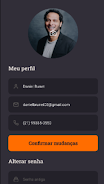
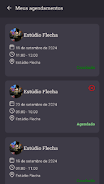
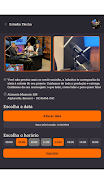
The app presents room-by-room calendars so each space has its own timeline and visual availability map. Users interact with a day, week, or month view where appointments are color-coded and time blocks can be selected with a simple tap; quick reservation dialogs capture title, duration, recurrence, and optional notes. Real-time synchronization with external calendar services ensures entries made in email calendars or desktop apps appear in Infinitus App as they update, and conflict detection highlights double-booking risks before a reservation is confirmed.
Controls and interaction
Controls are designed for both mobile and tablet usage with straightforward touch gestures. Tap to create or open a booking, drag or long-press to move times within the open interface, and swipe to cancel or archive events from personal views. Administrative actions are accessible through contextual menus, letting office managers approve or edit bookings, set room availability windows, and add reminders. The interface focuses on speed: common tasks take only a few taps so front-line employees can reserve a room and return to work quickly.
Progression and organizational workflows
Infinitus App supports progression in the sense of adoption and increasing efficiency across teams: recurring meeting templates allow groups to save standard booking configurations, approval flows enable managers to require sign-off for special-purpose rooms, and reporting tools show utilization trends so facilities teams can plan changes. New users can start with basic bookings and grow into templates, recurring schedules, and custom approval policies as organizational needs become more sophisticated.
Visual style and layout
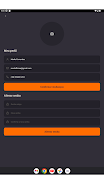
The visual design favors clarity and contrast so availability, ongoing meetings, and free slots are visible at a glance. Room calendars display capacity and a short summary of equipment where available, while timeline bars use consistent color language to indicate confirmed, tentative, and pending bookings. Typography, spacing, and iconography are chosen to minimize clutter on smaller screens while preserving informative density on tablets and larger displays.
Room organization and level structure
Spaces are organized into logical hierarchies such as floors, departments, or building zones to help users find appropriate rooms quickly. Each room page provides its schedule, description, capacity, and a list of typical amenities so employees can filter or search based on size and resources. This structure helps medium and large organizations break their inventory into manageable sections rather than a single long list.
Customization and management
Administrators can tune booking policies, adjust default durations, define blackout periods, and set who may create or edit reservations. Color schemes and calendar labels are configurable to align with internal conventions, and recurring meeting rules can be tailored for different teams. Centralized logs make it easy to audit bookings and export utilization data for workplace planning without reinventing broader resource management systems.
Replay value, reliability, and offline behavior
While Infinitus App is primarily a productivity tool rather than a game, it encourages repeat use through time-savers like templates, one-tap repeats of recent bookings, and saved favorite rooms. The app is built to be reliable with incremental sync and conflict resolution; it also offers limited offline access to recently synced schedules so users can view upcoming bookings when connectivity is intermittent, while write actions queue and send when a connection is restored.
Accessibility and user experience
Accessibility considerations include readable contrast, scalable text, and touch targets sized for comfortable selection. The app supports keyboard navigation on devices that provide it and provides clear labeling for screen readers so visually impaired users can browse room availability and make reservations. The onboarding flow introduces basic features and offers in-app help so teams can adopt the system without costly training sessions.
Challenges and best practices
To get the most from Infinitus App organizations should configure external calendar synchronization and encourage consistent data entry so availability reflects reality. Because effectiveness depends on use patterns, assigning basic guidelines for recurring meetings and ownership of shared rooms reduces accidental conflicts. For groups needing broader facilities or inventory tracking, Infinitus App works well alongside dedicated resource-management tools rather than trying to replace them.






