





Dmusk Seller

| Package ID: | |
|---|---|
| Latest Version: | v1.0.0 |
| Latest update: | May 18, 2026 12:20:04 |
| Developer: | Dmusk |
| Requirements: | Android |
| Category: | Finance |
| Size: | 30.94 MB |
| Tags: | System Navigation Date |
Rating :4.1
Dmusk Seller puts a compact business management suite on your device so retailers can manage products, promotions and orders from one place. With Dmusk Seller you can centralize product listings, set prices, run time-limited offers and handle customer orders without switching between multiple tools, making it easier to keep day-to-day operations running smoothly. The app is designed for small to medium merchants who sell groceries, textiles, medicines, food or construction materials and want a focused, reliable tool for inventory and order handling.
Key Features
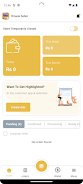
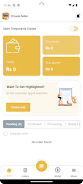
The core of Dmusk Seller is a set of practical tools that reflect real retail workflows. Inventory management lets you keep product details and prices together while real-time updates ensure staff and customers see the same information. Promotion management supports discounts and time-limited campaigns so you can plan sales and special offers. Store listing features help you present your catalogue to a wider local audience and attract new customers. Order processing is streamlined to reduce manual steps and support timely fulfillment, and activity logs make it straightforward to review recent changes and orders.
How the app works
Start by adding products and basic pricing information, then use the promotion editor to schedule discounts or limited-time deals. Orders appear in a clear workflow so you can confirm, pack and mark them fulfilled as each step completes. The application groups related tasks to reduce repetitive entry: for example, updating a product price will reflect across listings and active promotions so you don’t need to edit the same information in several places. Notifications and status markers keep you informed about pending orders or promotions that are about to expire, helping you prioritize daily tasks.
Controls and user experience
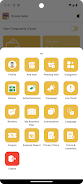
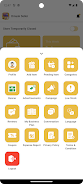
Navigation is designed for quick, touch-first interactions: simple menus guide you to inventory, promotions or orders, while in-screen search and filters help find products by name, category or SKU. Item pages are laid out to show the most relevant information first — price, stock levels and current offers — and action buttons are clearly labeled to reduce mistakes during busy periods. Dmusk Seller focuses on predictability and minimal taps so employees can learn core tasks quickly and complete routine operations without delay.
Progression, customization and visual design
Rather than a game-like progression, Dmusk Seller supports business growth through practical milestones such as expanding product ranges, activating recurring promotions and improving order turnaround. The app lets you organize products into categories and use descriptive images or notes to differentiate items. Visual design emphasizes clarity with readable type, consistent spacing and a neutral color palette so product information remains the focal point. You can tailor product visibility and promotional timing to match sales cycles, which creates a simple progression of more efficient workflows as your catalogue expands.
Offline use, accessibility and reliability
The app is built to accommodate common connectivity patterns in retail: essential product and order information is available when connectivity is intermittent, and changes are synchronized when a stable connection returns so daily operations are not blocked by short network outages. Accessibility considerations include adjustable text sizes, clear contrast for labels and logical navigation order so staff with different needs can use the app comfortably. Lightweight data use and concise screens help the app perform well on a wide range of Android devices.
Challenge systems and ongoing value
Dmusk Seller includes practical challenge-like elements that keep the daily work engaging and focused: timed promotions require attention to scheduling, inventory thresholds prompt restocking actions and order backlogs highlight process improvements. This creates replay value in the sense of ongoing cycles — prepare promotions, fulfill orders, analyze results and refine listings — that encourage repeated use and continuous improvement of store operations. Regular use of the app helps merchants shorten fulfillment times and identify the most effective promotions for their customer base.
Advantages and limitations
Dmusk Seller streamlines many routine tasks so you can spend more time on customer service and sales. Its centralized approach reduces duplicate entry and supports reliable fulfillment, while store listing features help expand reach. On the other hand, initial setup of product catalogues and prices can be time consuming and the app is optimized for merchants selling physical goods rather than service-only businesses. For retailers who need a compact, practical tool for inventory, promotions and order management, Dmusk Seller offers a focused solution that grows with everyday store needs.






