
Parking Check-In

| Package ID: | |
|---|---|
| Latest Version: | v1.0.0 |
| Latest update: | May 18, 2026 10:11:05 |
| Developer: | Vuong B |
| Requirements: | Android |
| Category: | Lifestyle |
| Size: | 15.84 MB |
| Tags: | Travel Navigation Date |
Rating :4.2
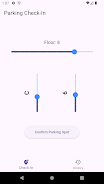
Parking Check-In is a lightweight utility that helps you remember where you parked by recording the parking lot number and the basement floor so you can find your vehicle later. Designed for people who use large garages, multi-level lots, or unfamiliar parking structures, Parking Check-In focuses on a fast, low-friction check-in workflow: enter the lot identifier and the floor when you park, save the entry, and consult it when you return to the garage.
Key Features
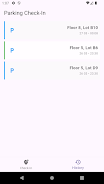
The app centers on a minimal set of tools that are easy to use on the go. Enter a parking lot number and basement floor on a single screen and save the entry in one tap. Each saved record includes a timestamp so you can see when you parked, and entries appear in a simple history list for quick retrieval. You can edit or delete saved entries when plans change, and the app keeps a compact log of recent check-ins for reuse. The interface is intentionally uncluttered to make the check-in process fast and reliable without introducing complex settings.
How It Works
Parking Check-In uses manual input rather than GPS so it avoids unnecessary battery drain and respects your privacy; all data is stored locally on your device. To use it, open the app when you park, type the lot number and floor into the fields, then tap save. When you return, open the app to view your most recent entry or browse the history to find earlier records. The straightforward controls — labeled fields, a clear save button, and visible timestamps — are designed to reduce hesitation and make the app part of your routine.
User Experience and Controls
The user experience emphasizes speed and clarity: large input fields, prominent action buttons, and readable text help you complete a check-in in seconds. Controls are standard Android form elements so they behave predictably with the system keyboard and input methods. A dedicated history view lets you tap an entry to inspect details, update the lot or floor, or remove it if no longer needed. Because the app limits itself to core parking details, there is little to learn and minimal friction when returning to the app after a long interval.
Visual Style and Accessibility
Visual design favors a clean, high-contrast layout with clear typography to remain legible in a range of lighting conditions that you might encounter in garages or basements. Parking Check-In is built to respect system font scaling and basic accessibility services; it works with Android screen readers and follows platform conventions so users who need larger text or voice feedback can navigate entries and actions more easily. Color choices and spacing are optimized to avoid clutter while keeping the most important information prominent.
Progression, Replay Value and Offline Use
Rather than a progression system found in games, Parking Check-In offers practical progression through its history of saved check-ins: over time you build a short, consultable log of parking locations that can save time on repeat visits to familiar venues. The app increases in utility the more you use it because previous entries can be quickly referenced instead of retyped. Because it stores all information locally, Parking Check-In works fully offline and does not require an internet connection to record or retrieve entries.
Limitations and Practical Notes
Parking Check-In intentionally focuses on the basics: it records lot numbers and floor levels but does not provide advanced mapping, turn-by-turn directions, or automatic GPS-based tracking. That simplicity keeps the app fast and private, but it does rely on manual check-ins, so the main user responsibility is remembering to log the location when you park. For drivers who prefer automated location services or integrated navigation, a dedicated mapping app would be a better fit; for anyone who wants a lightweight, dependable way to save where they parked, Parking Check-In offers a concise and reliable tool.
Who Should Use It
If you regularly park in multi-level garages, underground basements, or large lots and you value a simple, low-overhead solution for remembering your car location, Parking Check-In provides a focused approach without unnecessary features. The app is suited to commuters, shoppers, and travelers who need a quick reminder of lot and floor details and who prefer a straightforward, privacy-minded utility that works offline and integrates with standard Android accessibility options.






