

Apps
Photography
Snapnote
Snapnote

| Package ID: | |
|---|---|
| Latest Version: | v1.1.11 |
| Latest update: | May 03, 2026 13:35:05 |
| Developer: | Otio Emmanuel |
| Requirements: | Android |
| Category: | Photography |
| Size: | 39.11 MB |
| Tags: | Photo Camera Date |
Rating :4.4
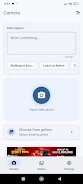
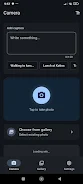
Snapnote is a simple, fast camera app that lets you add custom text directly onto photos as you take them, so each image carries the context you need without extra editing steps. Designed for fieldwork, project updates, location labels or quick visual reminders, Snapnote helps you capture and annotate in one motion to save time and keep images organized. Instead of snapping first and writing later, the app puts notes on-screen during capture, with adjustable size and placement so labels are clear before you save or share. This approach makes photos into meaningful, labeled records for professionals, students, and everyday users.
Key Features
⭐ Real-time text overlay that places your notes on the photo at the moment of capture for immediate context.
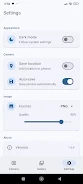
⭐ Adjustable text size and placement so labels remain readable and well positioned before saving or sharing.
⭐ Fast capture workflow that removes the separate editing step, keeping your photo library organized from the start.
⭐ Useful for documenting field activities, project updates, locations, and quick visual reminders with clear on-image notes.
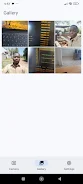
⭐ Snapnote keeps annotations attached to images so important details travel with the photo.
Advantages
✅ Saves time by eliminating post-capture editing with Snapnote's on-capture annotation.
✅ Helps maintain organized, labeled image records for work, study, or personal use.
✅ Simple and focused interface lets users add essential information without interrupting the photo‑taking process.
✅ Makes it easy to share photos that already include context, reducing follow-up explanation.
Disadvantages
❎ Focused primarily on text annotation, so it does not replace full-featured photo editors with advanced image adjustments.
❎ If you need complex graphics or layered annotations, a dedicated annotation or editing tool may still be required.






