
Apps
Productivity
Clean Notes
Clean Notes
| Package ID: | |
|---|---|
| Latest Version: | v1.0 |
| Latest update: | May 21, 2026 12:24:04 |
| Developer: | THE QUEEN FASHION TRADING INVESTMENT COMPANY |
| Requirements: | Android |
| Category: | Productivity |
| Size: | 11.00 MB |
| Tags: | Shopping Navigation Read |
Rating :4.0
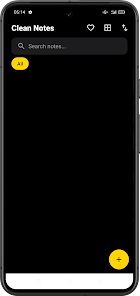
Clean Notes is a minimalist note-taking app that helps you capture everyday thoughts, tasks and reminders in a focused, dark-themed workspace. From quick shopping lists to brief project reminders, Clean Notes opens a simple editor so you can record ideas without distraction, then return to them with an easy keyword search when you need details again.
Core functionality
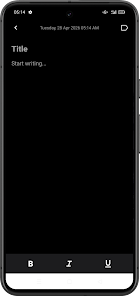
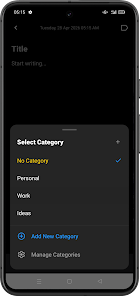
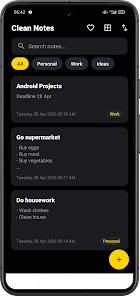
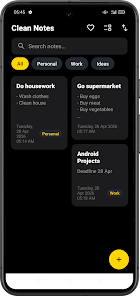
The app centers on fast creation and straightforward editing of plain text notes. You can open a new note with a single tap, type a short title and body, and apply simple formatting such as bold, italic and underline to emphasize key points. Notes can be arranged into built-in categories like Personal, Work and Ideas, and you can add custom categories to match your workflow. Switch between list and grid views to scan content the way you prefer, while sorting options keep recent or important items visible at the top of your list.
Controls and interaction
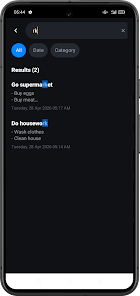
Clean Notes relies on familiar mobile controls: touch to create or edit, long-press to select an item for batch actions, and swipe gestures to move between categories or archive an entry. The text editor supports standard keyboard entry and selection, and the UI is designed to minimize accidental taps so you can compose quickly. Search is available from the top bar; enter a keyword and results appear instantly, highlighting matching text for easier scanning.
Organization and progression
Rather than complex project management, Clean Notes focuses on steady progression of your daily tasks and ideas. Create short notes for one-off tasks, group related notes into a category to track a small project, and use sorting to surface ongoing items. As your collection grows you can refine categories or move older notes out of sight, which helps maintain a compact and productive workspace without a steep learning curve.
Visual style and customization
The visual design emphasizes legibility and calm: a dark theme reduces glare for night use, while typography and spacing keep entries readable at a glance. Clean Notes offers subtle customization such as switching between list and grid layout and choosing basic display density so you can see more items or enjoy larger, easier-to-read cards. The interface avoids heavy ornamentation so content remains the focal point.
User experience and accessibility
Accessibility considerations are built into the app’s simple structure. Text size and contrast are selected to aid readability, and the uncluttered interface reduces cognitive load for users who prefer a straightforward environment. Keyboard input, selection handles and touch targets are sized to support one-handed use, and the app stays responsive on mid-range devices so navigation feels smooth across varied hardware.
Offline use and reliability
Clean Notes is designed to be reliable when you need it most: notes are available locally so you can view and edit content offline without depending on an internet connection. Because the app emphasizes short entries and quick editing, it works well for capturing ideas on the go, in places with limited connectivity or when you want to conserve data.
Customization and repeated use
Customization focuses on practical controls rather than extra features: add and rename categories, choose list or grid displays, and use basic formatting to make important points stand out. This modest feature set encourages repeated use because it removes friction—creating a new note, tagging it, and finding it later is fast and predictable. Many users return daily to maintain shopping lists, capture fleeting ideas, or keep brief agendas for upcoming tasks.
Limitations to consider
While Clean Notes keeps things intentionally simple, it is not intended for heavy project management or long-form document editing. Advanced layout options, rich media embedding and collaborative or online-only features are not part of the core experience. If you need deep formatting, version history or team collaboration, a different tool may better suit those needs.
Who benefits most
Clean Notes is a practical choice for anyone who values a distraction-free workspace and needs quick, reliable note capture. It suits students, busy parents, professionals keeping short reminders, and anyone who prefers lightweight organization without a steep learning curve. The app’s combination of focused editing, straightforward categorization and offline availability makes it a solid daily driver for simple note-taking scenarios.






