
Don't Touch

| Package ID: | |
|---|---|
| Latest Version: | v1.3 |
| Latest update: | May 21, 2026 09:27:03 |
| Developer: | BronzeRock Labs |
| Requirements: | Android |
| Category: | Lifestyle |
| Size: | 4.82 MB |
| Tags: | System Navigation Read |
Rating :4.0
Don't Touch is a focused, minimalist utility that records every phone unlock and displays that information as a clean, digital mirror of your habits. Don't Touch does not offer coaching, blocking or gamified rewards; instead it presents unlock counts, daily totals and quick trend views so you can see how often you reach for your device. The app’s simplicity makes it easy to install and use immediately, with a small learning curve and a clear purpose: to provide an honest, distraction-free snapshot of interaction frequency.
What the app does
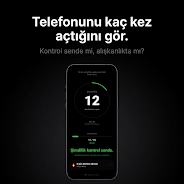
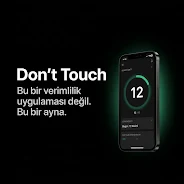
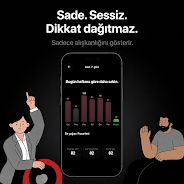
At its core, Don't Touch increments a precise counter each time your device is unlocked and shows that number in real time. The main view is intentionally spare: a large numeric display for the current day, a recent history area that summarizes the last seven days, and small summary rows for weekly and monthly averages. A visible daily limit indicator can be set by the user so you have an at-a-glance way to notice when your unlocks exceed a target you define. These elements work together to make unconscious checking behavior obvious and measurable without adding prompts or advice.
Controls and user experience
Interaction is straightforward: open the app to view current counts and trends, use the settings panel to set or adjust a daily unlock threshold, and tap to access seven-day charts or average statistics. The interface favors large touch targets and simple navigation so that users can glance at data quickly and return to their normal flow. Controls are intentionally minimal — there are no timers to configure, no blocking rules to manage, and no achievement paths to follow — reflecting the app's commitment to be a mirror rather than a coach.
Progression and challenge design
Although Don't Touch avoids gamification, it supports a lightweight progression concept through personal goals and visible limits. Setting a daily unlock threshold turns plain counts into a personal benchmark that encourages awareness and self-reflection. Progression is measured over time via averages and trends: as daily, weekly and monthly averages change you can see whether your behavior is trending toward fewer unlocks or more. This slow, data-driven progression is designed to encourage lasting awareness rather than short-term fixes.
Visual style and customization
The app adopts a dark, minimalist design that puts data front and center. Typography is large and clear with high-contrast digit displays so information remains readable in a variety of lighting conditions. Basic customization options let you choose between a dark or light display, adjust text size for easier reading, and enable or disable subtle animations in the charts to match your device performance preferences. Premium chart detail is available for those who want deeper visual analysis, while the default view keeps complexity to a minimum.
Data structure and offline behavior
All unlock events are recorded locally and the app functions without requiring an internet connection for its core features. That makes Don't Touch a dependable tool on phones that are often offline or subject to strict data controls. Because the app is built to be lightweight, it uses minimal storage and runs without creating persistent background tasks beyond the necessary event logging, preserving battery and system responsiveness.
Accessibility
Accessibility considerations include large fonts, high-contrast color schemes, and clear layout so that information is readable for a broad range of users. The app is designed to play well with system-level accessibility services such as screen readers and text scaling. These features aim to make the mirror concept usable for people who prefer larger interface elements or who rely on assistive technologies.
Replay value and long-term use
Don't Touch offers strong replay value for users who want ongoing awareness of their device interactions. The daily numbers and seven-day view create an easy habit: open the app each day to check your counts and note any trends. Over time the accumulation of daily records and rolling averages supplies a meaningful picture of behavior change, which supports thoughtful adjustments without pressure or instructive content.
Limitations and transparency
It’s important to understand what Don't Touch intentionally does not do. The app tracks unlock events only; it is not a full screen-time manager and does not log individual app usage or session lengths. There is no coaching, blocking or motivational system built in — the purpose is to reflect behavior rather than direct it. Some advanced charting features are described as premium and may require an in-app upgrade to access more granular analytics. Finally, the app requests only the minimal permissions needed to detect unlock events and stores all records locally for privacy.
Who should install it
Don't Touch is suited for users who prefer a low-friction, data-first approach to understanding device use. If you want a lightweight, private tool that makes unconscious checking obvious without turning your phone into a behavior coach, this app provides a clear mirror. It’s especially useful for people who want measurable insight, prefer simple controls, and value a minimal visual experience over elaborate features.






