
Apps
Media & Video
Piano ORG
Piano ORG

| Package ID: | |
|---|---|
| Latest Version: | v2.8 |
| Latest update: | May 20, 2026 11:28:05 |
| Developer: | TinyKitten Studio |
| Requirements: | Android |
| Category: | Media & Video |
| Size: | 112.00 MB |
| Tags: | Music |
Rating :4.1
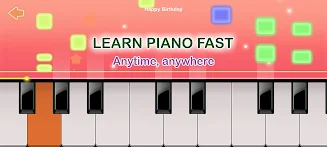
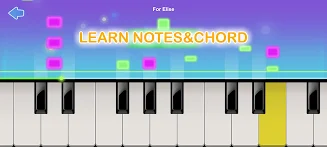
Piano ORG brings a compact, full-featured piano studio to your phone, combining an authentic 88-key layout with practice tools and a built-in score library so you can learn, play and record anywhere. Piano ORG is suitable for beginners who want guided lessons and for hobbyists who want a range of realistic instrument sounds; the interface keeps core controls within reach while offering enough depth for longer practice sessions and creative exploration.
Key Features
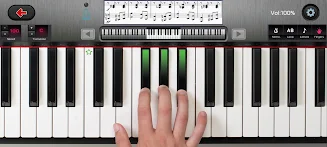
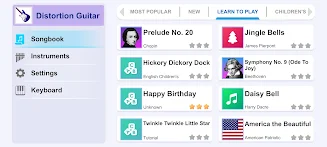
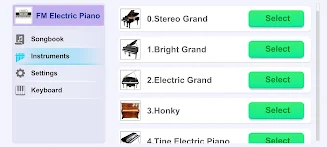
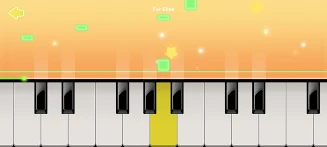
The app presents a full-range 88-key keyboard that fits on most modern phones and tablets, with multi-touch support so you can play chords and runs naturally. A library of popular scores spans classical pieces, pop songs and simple exercises, and you can switch between 128 different instrument voices including grand pianos, electric pianos, organs and harpsichords. Playback controls include autoplay, semi-auto play, a note pause mode that isolates difficult passages, and tempo adjustment so you can slow down or speed up a piece without changing pitch. Recording is available in MIDI and AAC formats so you can export performances or import MIDI files for practice.
Controls and Gameplay Mechanics
Touch sensitivity is configurable to match your device and playing style: adjust key size, velocity curve and sustain behavior to simulate a lighter or firmer response. On-screen controls provide metronome, loop selection and section looping so you can repeat a bar or phrase while focusing on accuracy. Autoplay and semi-auto modes let the app highlight or play the left or right hand parts, which is useful when learning new pieces. Note pause isolates single notes or short runs to help you work through tricky passages at your own pace.
Progression and Lesson Structure
The learning path is organized into progressive lessons and exercises that move from basic finger placement and simple melodies to more complex rhythm and coordination drills. Each lesson includes an example performance, slowed playback, and a practice mode that breaks the score into short segments. Progress is tracked locally through saved recordings and lesson completion markers, allowing you to return to previous material and compare improvements over time. Piano ORG supports iterative practice: repeat sections at varied tempos and gradually increase difficulty as accuracy improves.
Visual Style and Customization
Visually, the app keeps a clean keyboard-first layout with optional score view so you can follow notation while playing. Theme options let you choose contrast levels and keyboard colors for better visibility in different lighting. You can resize the keyboard to prioritize key size or display more of the score, and map the on-screen controls to suit left- or right-handed playing. Instrument-specific visual cues help distinguish between piano, organ and synth voices while you perform.
Replay Value and Creative Uses
Beyond lessons, the app offers replay value through open-ended exploration of different sounds and arrangements. Experiment with instrument combinations, apply simple effects like reverb or chorus where supported by your device audio, and use recording features to assemble short practice compilations. The ability to export MIDI and AAC files means you can bring recorded material into other music apps for further editing or sharing with collaborators outside the app environment.
Accessibility, Offline Play and Device Compatibility
Accessibility options include adjustable key sizes, high-contrast themes and tempo controls that help learners with visual or motor challenges. The lessons and score library are available offline after initial download, so you can practice without an internet connection. Performance and audio quality will vary by device capabilities; modern phones and tablets will generally provide the best sound fidelity and low-latency response.
Practice Challenges and Training Tools
Practice modes include timed exercises, accuracy-focused drills and rhythm challenges that isolate left- or right-hand parts. Section looping and tempo scaling are ideal for incremental improvement: start slow, perfect the motion, then raise speed. The app’s pause-on-note function helps you identify missed notes in context, turning each mistake into a targeted training opportunity rather than a frustrating interruption.
Limitations and Expectations
While Piano ORG brings a rich set of features to mobile devices, it does not replicate the weighted hammer action of an acoustic piano and will feel different from a full-sized instrument. Sound quality depends on your device and output setup, and advanced studio effects or professional-grade sampling are limited by mobile hardware. For students and hobbyists seeking a portable, flexible practice companion, Piano ORG provides practical tools for steady improvement and musical exploration.






