

CASE Conf 2025

| Package ID: | |
|---|---|
| Latest Version: | v1.24.0 |
| Latest update: | May 16, 2026 13:19:04 |
| Developer: | A2Z Personify LLC |
| Requirements: | Android |
| Category: | Other |
| Size: | 28.14 MB |
| Tags: | Education Navigation Date |
Rating :4.4
CASE Conf 2025 brings the full conference program and floor plan into your pocket so you can plan sessions, discover exhibitors and navigate the venue with confidence; the CASE Conf 2025 mobile app organizes schedules, exhibitor information and event resources in one place, making it easier for both first-time visitors and returning delegates to move efficiently between education sessions and the Trade Show.
Key features and what you can do
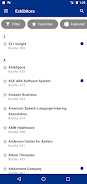
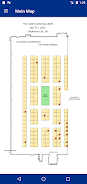
The app offers searchable education session listings and a clear daily schedule view so you can filter by track, speaker or topic, and build a personal agenda. Interactive exhibit hall floor maps help you locate booths and aisles with zoom and pan controls that mirror familiar map gestures. The exhibitor directory provides company names, booth numbers and any organizer-supplied descriptions or links, while the resource area centralizes PDFs, session handouts and official announcements. CASE Conf 2025 also surfaces timely updates from organizers so attendees can stay informed about room changes or schedule adjustments.
Navigation, controls and user flow
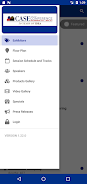
Navigation in the app follows a straightforward tab-based flow that places schedules, map, exhibitors and resources within one reachable toolbar. Controls are gesture-friendly: tap to open session details, pinch to zoom maps and swipe between days on the schedule. Creating your personal itinerary requires only a tap on a session or exhibitor to add it to your saved list; saved items are visible across the schedule and map views so you can quickly switch from planning to on-the-ground navigation without retracing steps.
Progression, personalization and replayability
Progression in the app is centered on your day-by-day agenda rather than levels or scores: as you add sessions and visits to exhibitors, the app helps you spot gaps in your schedule and suggests nearby booths of interest. Personalization options let you categorize saved items, add private notes to sessions and sort sessions by time, track or speaker. After the conference, saved session records and downloaded materials remain accessible so you can review presentations and follow up with exhibitors, giving the app practical replay value for post-event reference.
Visual design, maps and level structure of the event
The visual style prioritizes legibility and quick scanning: clear typographic hierarchy highlights session titles, times and locations so you can assess options at a glance. Exhibit hall maps use layered visuals to indicate aisles, booth blocks and key landmarks within the venue so you can orient yourself quickly; colors, labels and simple iconography distinguish session rooms, registration zones and exhibitor areas. The event’s structure—plenary sessions, concurrent tracks and the Trade Show floor—is represented consistently across the schedule and map to reduce friction when moving between areas.
Customization, accessibility and offline use
Customization focuses on tailoring the schedule to your priorities: set filters to show only relevant tracks, star favorite exhibitors and export your personal daily agenda to your device calendar where supported. Accessibility considerations include scalable text and contrast-aware color choices to improve readability, while the app supports basic offline access by caching your saved schedule and downloaded resources so you can reference key information even with limited connectivity; however, live updates and some exhibitor links may require an internet connection.
User experience, support and known limitations
The in-app experience emphasizes quick decision-making and wayfinding: session pages combine descriptions, speaker bios and room assignments so you have the necessary context before you attend. For support, the app points users to organizer contact information and common troubleshooting tips if content appears incomplete. Limitations reflect the nature of event apps: content depends on organizer-supplied data and may change during the conference, some interactive features require network access and the app is primarily tailored to The 2025 CASE Conference, so functionality beyond the event will be limited.
Getting started with CASE Conf 2025
To begin, open CASE Conf 2025, allow optional calendar integration if you want sessions synchronized to your device calendar, then browse the schedule or search the exhibitor list to create your personalized agenda. Spending a few minutes setting filters and saving priority sessions on arrival will make navigation and networking during the event smoother and ensure you can focus on sessions and exhibitors that matter most to you.