
Habito

| Package ID: | |
|---|---|
| Latest Version: | v2.0.0 |
| Latest update: | May 16, 2026 11:21:03 |
| Developer: | DroidPramit |
| Requirements: | Android |
| Category: | Wallpaper |
| Size: | 29.00 MB |
| Tags: | Common Social Navigation |
Rating :4.4
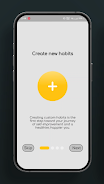
Habito is a focused habit-tracking app that helps you turn intentions into everyday routines by letting you create custom daily actions, monitor progress, and celebrate milestones. Habito is designed for people who want a low-friction approach to consistency: the interface centers on simple habit creation, a calendar-style overview, and month-by-month statistics so you can see what changed and when. The first step is adding an action, and after that the app keeps tracking streaks, recent performance, and small rewards that reinforce progress.
Key features
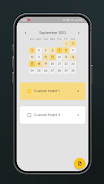
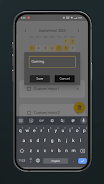
The app provides a clean calendar view that highlights days when a habit was completed and a compact 30-day statistics panel that summarizes recent trends. Creating a habit is straightforward: name the action, choose how often it should appear in your day, and habit entries appear on your timeline for quick interaction. Built-in milestone celebrations and lightweight reward mechanics give short-term goals to chase without distracting from long-term consistency. The bi-color minimalist design keeps attention on tasks rather than buttons or animations, and privacy-focused choices mean data is kept local and treated as personal information.
How it works in practice
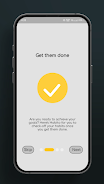
Tracking in Habito is intentionally simple to reduce friction. Most habit interactions are meant to be completed in one or two taps, so marking a habit done or editing its details takes minimal time. The calendar acts as the central control surface: you can scan past days to check consistency and tap into any entry for more context. Habito’s progress indicators focus on recent windows—the 30-day view is designed to highlight patterns and short-term momentum—while milestone badges help users recognize key streaks and achievements as they build habits week by week.
Progression, challenges and replay value
Progression in Habito follows daily repetition and streak maintenance rather than artificial leveling. Users progress by increasing streak length, completing 30-day challenges, or stacking related habits into morning or evening routines. The app encourages replay value by making habit sessions quick, measurable, and repeatable: once a habit exists in your list, it becomes part of the daily loop. Optional micro-challenges—such as a 7-day consistency target or a 30-day improvement goal—provide short campaigns that keep behavior change engaging without needing external competition or online leaderboards.
Customization and controls
Customization is focused and practical: you can create custom habit names, set how frequently an action should appear, and arrange habits to reflect priorities or time of day. Controls emphasize ease of use, with the interface designed for single-handed operation and fast completion of tasks. Editing a habit or checking detailed 30-day statistics can be done from the same view, keeping interruptions to a minimum. The minimalist color scheme supports quick scanning and helps users with low vision focus on completion signals rather than decorative elements.
Visual style and accessibility
Habito’s bi-color aesthetic is chosen to reduce visual clutter and make important information stand out, such as completed days on the calendar and streak counts. Text and contrast choices prioritize legibility, and the layout scales well across common phone sizes so entries remain tappable without crowding. Where possible, the app keeps interactions predictable and consistent, which benefits users who rely on screen readers or simplified navigation patterns.
Privacy, offline use and data handling
Privacy is a central consideration: habit records are treated as personal data and the design favors local storage and minimal permissions. This means you can use Habito offline for day-to-day tracking and view your recent statistics without a network connection. Export or backup options are presented in a privacy-respecting way so you control whether your history leaves the device. The result is a straightforward habit journal that works reliably whether you’re connected or not.
Limitations to consider
Habito emphasizes simplicity over deep analytics: the focus on 30-day statistics makes recent trends obvious, but it may not substitute for tools that provide long-term historical analysis or advanced quantitative reports. The minimalist approach also means fewer customization knobs than power-user trackers; you’ll find a smooth daily experience rather than extensive rule-based automation or external integrations. There are no social features or multiplayer elements, keeping the experience private and self-directed.
Who will benefit
Habito suits users who prefer a distraction-free habit tracker that is quick to use every day, values privacy and local control, and benefits from concise visual feedback rather than complex dashboards. If you want to improve productivity, health routines, or skill-building through steady repetition, Habito offers a compact, reliable way to turn intentions into consistent actions without overwhelming setup or noisy features.