
Apps
Travel & Local
interlink
interlink

| Package ID: | |
|---|---|
| Latest Version: | v1.0.2 |
| Latest update: | May 16, 2026 09:13:03 |
| Developer: | Interlink SG |
| Requirements: | Android |
| Category: | Travel & Local |
| Size: | 28.33 MB |
| Tags: | Camera Video Date |
Rating :4.3
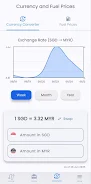
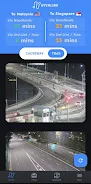
interlink is an app designed for people who cross the Singapore–Johor Bahru border via the Woodlands Causeway or Tuas Second Link. interlink combines live checkpoint camera feeds, estimated wait times and traffic alerts into a single, searchable interface so commuters, drivers and travellers can make informed decisions about when and where to cross. The first paragraph introduces the core use: quick visual checks of real-time cameras, concise wait-time guidance and tailored notifications that reduce uncertainty when travelling between Singapore and Johor Bahru.
Key features
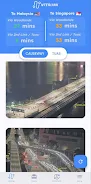
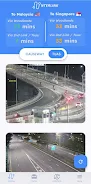
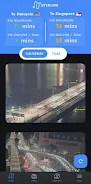
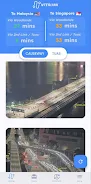
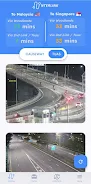
The app delivers continuous live camera views from the main checkpoints and selected JB entry points, allowing users to preview queue lengths visually before leaving. Estimated checkpoint wait times are generated from available checkpoint data and historical patterns; these estimates are presented alongside the camera feeds so you can compare a visual impression with an expected delay. Traffic alerts surface incidents such as accidents, heavy congestion or temporary checkpoint closures, and each alert includes a short explanatory note so you know whether the issue is local or likely to affect both directions.
interlink includes a side-by-side comparison mode that places Woodlands Causeway and Tuas Second Link information next to each other, helping you pick the faster crossing based on current conditions. Past traffic trends are stored and displayed in an easy-to-read timeline so you can identify peak hours, holiday surges or recurring daily patterns. Custom notification options let you receive only the alerts you need: for example, an early-morning commute update, a weekend holiday warning or an incident alert for heavy vehicles.
User experience and controls
The app is designed for rapid one-handed use: camera thumbnails, current status and a concise wait-time estimate are visible on a single screen, with swipe gestures to cycle through additional cameras. Tapping a camera expands the feed and overlays the latest status notes and a timestamp. A simple toggle switches between a map view with camera pins and a list view for fast scanning. Settings provide granular control over notification types, update frequency and data usage limits so you can balance timeliness with battery and mobile data consumption.
Progression, customization and replay value
interlink supports personalized presets so frequent users can save preferred checkpoint combinations and notification schedules. Over time the app adapts by learning which notifications you dismiss or interact with, and it will suggest quieter crossing windows based on your typical travel times. While the app does not gamify usage, its replay value comes from improving commute planning: reviewing historical patterns and trying different crossing times often produces measurable savings in waiting time and fuel.
Visual style and level structure
The visual design focuses on clarity: high-contrast text overlays on camera thumbnails, concise status badges and a muted map palette that emphasizes live feeds and incident markers. The app groups information by checkpoint and direction so each “level” of detail — thumbnail, expanded feed, historical trend — is one tap away. This layered approach reduces clutter and helps users get the information they need quickly, whether they are checking at home or on the road.
Performance, offline handling and accessibility
interlink uses lightweight video streams and thumbnails to minimize bandwidth while keeping feeds informative. Where possible the app caches the most recent camera snapshot and status so users can see the last known condition even when connectivity is spotty, but live video requires an internet connection. Accessibility features include adjustable text sizes, voiceover-friendly labels and high-contrast modes to help users with visibility needs. Battery-conscious modes reduce update frequency and suspend background refresh when the device is low on power.
Limitations and reliability
Because interlink depends on checkpoint-operated cameras and official data feeds, camera access or wait-time estimates may be temporarily unavailable or delayed during technical issues. Estimated wait times are guidance based on current and historical inputs and can change quickly during incidents; they should not be treated as guaranteed crossing durations. Coverage is concentrated on the Woodlands Causeway and Tuas Second Link and does not include smaller or unofficial crossings.
Who benefits
This app is practical for daily commuters, ride-hailing drivers, logistics and delivery workers, as well as occasional travellers planning cross-border trips. By consolidating visual feeds, status updates and personalized alerts, interlink helps reduce unnecessary waiting, save fuel and make border crossings more predictable. The app is neutral, privacy-conscious in its permissions, and focused on delivering timely, usable information rather than promotional content.