






Bird Batch Manager

| Package ID: | |
|---|---|
| Latest Version: | v2.0 |
| Latest update: | May 15, 2026 10:15:04 |
| Developer: | MEDIA WHIZZ LIMITED |
| Requirements: | Android |
| Category: | Tools |
| Size: | 57.88 MB |
| Tags: | Common System Navigation |
Rating :4.3
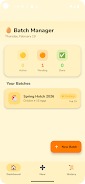
Bird Batch Manager is a lightweight productivity app that helps you convert repetitive chores and small routines into clear, stage-based workflows. From the first screen you can set up a sequence of steps, assign a batch name, and view progress at a glance; Bird Batch Manager keeps the focus on what comes next without clutter or needless options. Designed for people who prefer calm, repeatable processes over complex project tools, the app emphasizes simplicity, steady progress, and a reassuring visual rhythm as you move tasks from start to done.
How it works
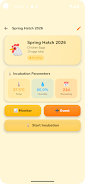
The core idea behind Bird Batch Manager is simple: group recurring tasks into batches and move each batch through defined stages. A batch might represent a morning routine, a weekly admin cycle, or any set of repeated steps. Each stage acts like a mini checkpoint so you can see work progressing step by step. Progress indicators and summary overviews show which stages are complete, which are in progress, and which are up next, helping you make reliable forward motion without having to rethink priorities constantly.
Controls and interaction
Interaction is intentionally straightforward to reduce friction. Tap to open a batch and advance a stage, swipe to reveal quick actions, and long press to rename or reorder a batch. The interface uses large touch targets and predictable gestures so common operations become muscle memory. Bird Batch Manager also supports quick keyboard navigation for users on tablets with external keyboards, and buttons are arranged to be reachable when holding the device with one hand.
Progression and structure
Progress is organized into repeatable cycles rather than rigid project phases. You create a batch, define its stage list, and then run that batch each time the routine recurs. Completion history is kept so you can review past cycles and spot patterns in how long each stage takes. This progression system encourages incremental improvement: small, consistent completions add up to steady outcomes without forcing heavy project planning or artificial milestones.
Visual style and accessibility
The visual design favors clarity and calm: uncluttered screens, subtle color accents to indicate stage status, and compact summary cards for quick scanning. Bird Batch Manager includes adjustable font sizes and high-contrast display options to support visibility needs. Labels and controls are compatible with common screen readers, and the app minimizes motion to keep transitions gentle for users who prefer reduced animations. Accessibility settings are exposed where they belong so you can tailor the look and feel without navigating deep menus.
Customization and templates
To streamline setup, you can build reusable batch templates that capture a typical stage sequence for recurring routines. Templates speed up creating new batches that follow the same structure while still allowing per-run tweaks like changing the order of stages or adding a short note. You can assign simple tags to batches for faster filtering and use color cues to mark priority or context, helping you adapt Bird Batch Manager to different parts of life without bloating the interface.
Replay value and offline reliability
Because most routines are repeated by design, the app naturally encourages replay: once you have a batch you run it again and again, refining timing and stage order as you learn what works. Bird Batch Manager stores data locally so you can use the tool offline and remain productive without a network connection. Local history and summaries are available immediately, and the app keeps resource use low so it runs well on a wide range of devices.
Challenge systems and motivation
Rather than gamifying work with complex rewards, Bird Batch Manager focuses on subtle motivation: visible streaks of completed batches, concise daily summaries, and the satisfaction of moving a batch through stages. These light challenge elements aim to reinforce habits without creating pressure. You can use the stage structure to create personal difficulty by adding optional steps or time buffers, turning routine runs into deliberate practice sessions when you want that extra focus.
Limitations and audience
Bird Batch Manager excels at repeated, stage-oriented routines but is not intended to replace heavyweight project management tools that track dependencies across many people or long-term strategic plans. Initial setup of batches and stages takes a few minutes to align to your habits, but once a routine is configured the app reduces decision overhead and helps maintain a steady, calm workflow. If you value clear next steps and gentle progress tracking, Bird Batch Manager provides a focused, user-friendly way to manage repeating tasks.