



CrispBoost is a compact Android utility designed to find and remove duplicate photos, videos, audio files and documents on your device; CrispBoost starts with a simple scan and guides you through cleanup steps so reclaiming storage is fast and low-effort. This first paragraph introduces the app’s purpose and tone: a lightweight, privacy-friendly tool that works on files stored locally and emphasizes clear previews and straightforward confirmation before any removal.
What it does
CrispBoost analyzes the media and document folders on your phone, groups files that are identical or effectively redundant, and presents those groups in a clear, sortable view. The app identifies duplicates that occupy the same content under different names as well as exact file copies, helping you locate large items such as duplicate videos and high-resolution photos that are most likely to free significant space. It does not require an internet connection and operates entirely on device storage, so personal files are not uploaded or indexed on a remote server.
How scanning works
The scanning process in CrispBoost runs in two main stages: a quick index that records file locations and metadata, followed by a comparison pass that groups files by content signature and metadata similarity. You can choose a faster scan to check recent folders or a more thorough scan that examines every gallery and document directory. Scan progress is shown with an on-screen indicator and estimated completion time so you know when the app is still working and when you can review results.
Controls and workflow
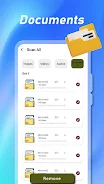
Controls are tap-based and designed to be familiar to Android users: start a scan from the main screen, tap a group to preview images or play audio, and use simple selection toggles to mark files for removal. The app displays thumbnails, file size, file path and modification date to help you decide which copies to keep. A one-tap auto-select option suggests files to delete based on size and age, while manual selection lets you retain specific versions. Every deletion requires confirmation so accidental removals are avoided.
Customization and filters
To tailor the experience you can filter results by file type, minimum size threshold, or folder location so the app focuses on the areas that matter most to you. Filters let you exclude system folders or specific directories you prefer to keep untouched. These options reduce noise in larger collections and speed up the decision process by showing only the duplicates that meet your chosen criteria.
Visual style and accessibility
CrispBoost presents a clean, minimal interface with both day and night display modes to reduce eye strain in different lighting conditions. Text sizes, contrast levels and simple iconography are used to keep the layout readable on small and large screens alike, and the interface respects Android accessibility settings so it works well with screen readers and high-contrast themes.
Progression and repeated use
The app is designed for repeated use: scans are fast enough to run weekly or as needed, and results are presented in ways that let you make quick, incremental cleanups. Instead of a one-time purge, the workflow encourages progressive maintenance—review large groups first, then target audio or video duplicates in subsequent passes—to keep your device organized over time without committing to a lengthy single session.
Performance and offline operation
Because CrispBoost focuses on local file analysis and a lightweight algorithm, it keeps memory and battery use modest during scans. The tool works offline and does not rely on cloud services, which makes it suitable for users who prefer to manage content directly on their device. Efficient scanning techniques mean the app can handle libraries with thousands of files without becoming intrusive.
User experience and limitations
The app aims to simplify file housekeeping by offering clear previews and recommended cleanup actions, but it is focused on duplicate detection rather than replacing a full-featured file manager. Cloud accounts and remote storage are outside the scope of its functionality, so users with mixed local and cloud libraries should consider that duplicates stored only online will not be detected. CrispBoost is best used as a complementary tool to tidy and free up local storage quickly.
Who should use it
CrispBoost is well suited for people who accumulate media on their phones—photographers, social users and anyone who records video or audio frequently—and need an uncomplicated way to declutter. It balances a simple, approachable workflow with useful controls and filters, making routine maintenance of photos, videos and documents faster while keeping user privacy and on-device performance central to the experience.