
Apps
Productivity
Habit Tracker - HabitSet
Habit Tracker - HabitSet

| Package ID: | |
|---|---|
| Latest Version: | v1.1.6 |
| Latest update: | May 04, 2026 09:27:04 |
| Developer: | egyindie |
| Requirements: | Android |
| Category: | Productivity |
| Size: | 32.00 MB |
Rating :4.3
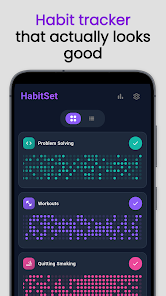
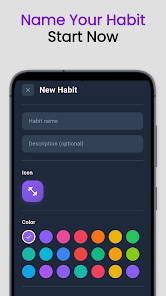
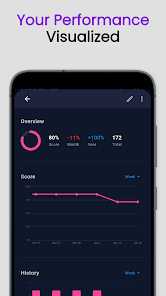
Habit Tracker - HabitSet is a focused habit-tracking app that helps you build positive routines and break bad ones through a simple, visual interface. The app presents each habit as a colorful tile-based grid so you can instantly see which days you succeeded and where momentum is building. Habit Tracker - HabitSet supports quick habit creation with customizable names, icons, colors and descriptions, flexible streak targets, reminders, a tappable calendar for editing past entries, archiving for temporary breaks, and local import/export for backups. Its on-device storage and no-sign-in approach make it a privacy-minded tool for consistent daily tracking.
Key Features
⭐ Habit Tracker - HabitSet displays habits as tile-based grid charts so progress is visible at a glance.
⭐ Create habits quickly by specifying a name, icon, color and short description.
⭐ Set flexible streak goals (daily, several times per week, monthly counts) and watch streaks grow.
⭐ Add reminders to any habit to receive notifications at the time you choose.
⭐ Use the tappable calendar to add or remove past completions with a single tap.
⭐ Archive habits to declutter the dashboard and export or import local backups when switching devices.
Advantages
✅ Habit Tracker - HabitSet’s visual grid layout makes progress and streaks easy to follow and motivating.
✅ All data remains on your device with no cloud storage or account required, protecting your privacy.
✅ Customizable dashboard and simple setup let you start tracking new habits quickly without a steep learning curve.
✅ Manual export/import and archiving give you control over backups and let you pause habits without losing history.
Disadvantages
❎ No cloud synchronization or sign-in option, so habits do not sync automatically across multiple devices.
❎ Transferring data between phones requires manually exporting and importing files.
❎ Since data is stored only on the device, you should remember to back up exports if you want to protect against device loss or damage.






