
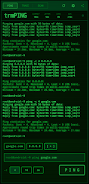
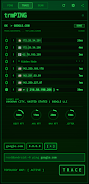
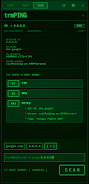
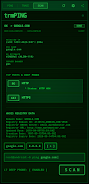
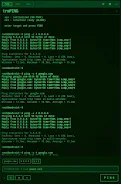
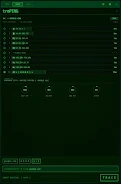
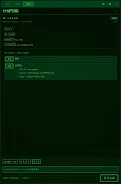

trmPING is a compact network diagnostics utility that shows raw telemetry instantly in a retro terminal-style interface, ideal for network engineers and power users who want fast, no-nonsense answers. Launch the app, type a host, and you’ll see latency, jitter and packet loss in real time, plus tools to test application-layer response, trace routes and inspect services. If you need a quick way to isolate routing problems, check open ports or verify SSL details without a heavy GUI, trmPING delivers focused diagnostics and clear output designed for speed and clarity.
Key Features
⭐ Real-time ICMP telemetry for latency, jitter and packet loss with instant raw output.
⭐ trmPING TCP Ping to hit specific ports and measure application-layer response times.
⭐ Visual Traceroute with a hop-by-hop topology view to reveal routing bottlenecks.
⭐ Port scan and recon that grabs server banners, checks SSL certificates and surfaces hidden services.
⭐ Network intelligence including reverse DNS, active interface detection and Geo-IP resolution.
Advantages
✅ Very fast, minimalist terminal interface that prioritizes telemetry over fluff.
✅ Combines multiple diagnostics—ping, traceroute, port scan and banner grabbing—in one tool.
✅ trmPING Pro is available as a one-time upgrade for a distraction-free, feature-rich experience.
✅ Theme and audio options in Pro (extended themes and sonar audio) help tailor troubleshooting workflows.
Disadvantages
❎ Free version includes ads; removing them requires the Pro upgrade.
❎ The retro terminal interface is deliberately minimal and may feel unfamiliar to users expecting graphical dashboards.
❎ This is the initial release, so some advanced features and refinements are planned but not yet available.
Version Information
This is the initial release of trmPING; the developer notes more features and improvements are planned for future updates, with the Pro one-time upgrade already providing theme, audio and fast-boot options.






