
Apps
Productivity
Power Automate
Power Automate

| Package ID: | |
|---|---|
| Latest Version: | v3.0.829 |
| Latest update: | Mar 12, 2026 12:07:03 |
| Developer: | |
| Requirements: | Android |
| Category: | Productivity |
| Size: | 104.60 MB |
| Tags: | System Office Date |
Rating :4.3
Power Automate puts Microsoft’s workflow automation into a compact, phone-friendly app that helps you take repetitive tasks off your plate. If you need to approve requests while away from the desk, capture sales leads, or route attachments to cloud storage without manual steps, Power Automate gives you a familiar set of tools in a mobile interface. It’s aimed at professionals who want to streamline simple daily tasks and keep tabs on important processes without opening a laptop, making automation accessible to anyone on the go.
Core Functions
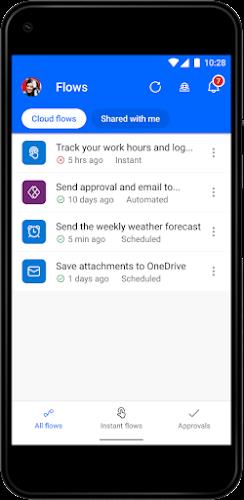
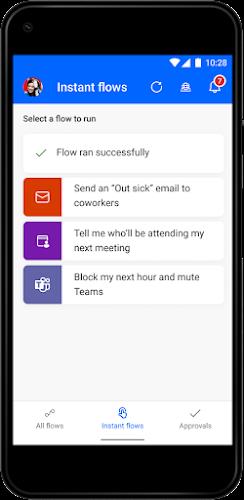
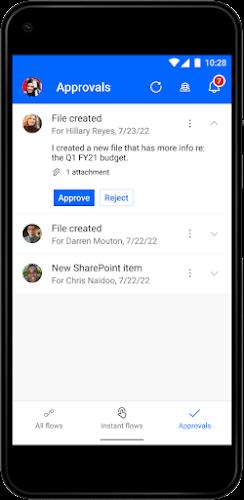
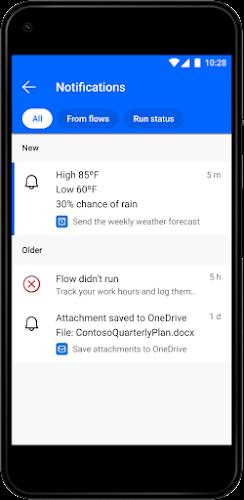
The app lets you create, edit and trigger flows directly from your device, so routine tasks run with a tap. You can monitor flow activity and receive push notifications when something needs attention, whether it’s an email from your manager or an update to a work item. Approvals can be granted from the palm of your hand and you can add a shortcut for an instant flow to your home screen. Power Automate also connects to many enterprise services to move data between cloud storage, CRM systems and collaboration tools.
Key Features
Trigger flows with a single tap. Edit flows on the go and manage their activity. Grant and track approvals from your mobile device. Send and receive push notifications to stay informed. Create a home-screen shortcut for instant flows. Automatically download email attachments to cloud storage. Record time entries to a spreadsheet with a tap. Capture, track and follow up on sales leads and connect them to your CRM. Integrates with hundreds of apps and services such as OneDrive, Dataverse, Office 365, Outlook, Microsoft Teams, SAP, Twitter, JIRA, Google Drive, Azure and Dropbox.
User Experience
The interface focuses on quick actions and clear status updates so non-technical users can benefit from automation without steep setup. Notifications and approval cards are designed for rapid responses, while flow monitoring highlights successes and failures so you can troubleshoot when needed. With mobile editing and instant triggers the app reduces friction between an idea for automation and its execution, freeing teams to move faster and keep essential processes visible on a small screen.
Conclusion
For professionals who want to automate routine work from anywhere, Power Automate delivers a capable and connected mobile experience. It shrinks common automation tasks into a few taps, supports a wide range of enterprise services, and keeps approvals and notifications within easy reach — a practical tool for boosting productivity on the move.






