
Games
Simulation
Phone Case DIY
Phone Case DIY
| Package ID: | |
|---|---|
| Latest Version: | v3.5.0.0 |
| Latest update: | Aug 05, 2026 07:55:03 |
| Developer: | |
| Requirements: | Android |
| Category: | Simulation |
| Size: | 183.68 MB |
| Tags: | Casual Level War |
Rating :4.0
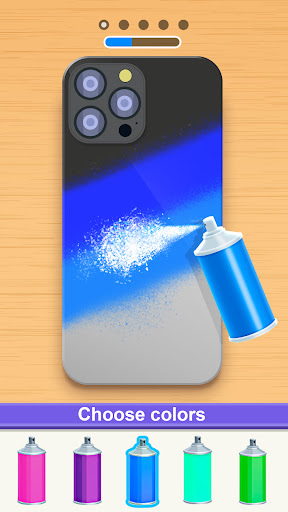
Phone Case DIY places creativity in your hands by turning simple templates into personalized wearable art; Phone Case DIY is a casual design app that focuses on painting, layering, and tactile decoration so players can build one-of-a-kind phone and headphone cases without pressure. The experience is aimed at users who enjoy DIY projects, simple art tools, and calm, exploratory gameplay: you choose a base case, clean and prep the surface, then apply paints, stencils, stickers and specialty effects to produce a finished piece you can admire or remake. The interface keeps common tools accessible so newcomers and experienced creators alike can focus on color, texture and composition.
Key Features
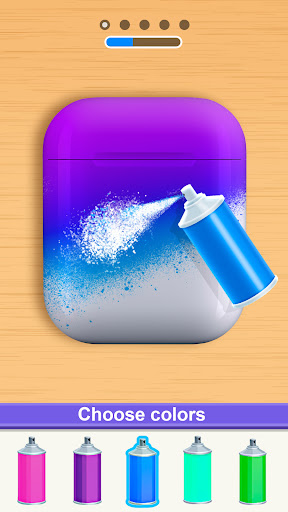
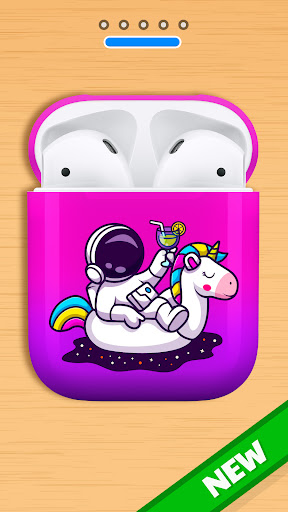
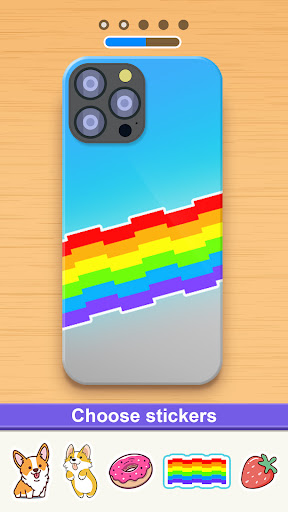
The core toolkit mirrors familiar craft techniques: spray and brush painting with adjustable size and opacity, stencil placement for sharp shapes, and layered stickers and decals for themes or logos. Specialty effects such as acrylic pours, tie-dye gradients and water marbling reproduce mixed-media textures through simple controls, while a jelly or injection coloring mode simulates soft, translucent layers for jelly-like cases. There is also a pop-it fidget-style option to place and color tactile bubbles for trendy, tactile designs. The app supports cleaning and prep steps so you can start with a blank, realistic canvas before decorating, and it offers a separate headphone shell canvas to expand creative possibilities beyond just phone backs.
Gameplay and Controls
Controls are touch-first and intuitive: drag to paint, pinch to zoom, rotate and position stencils or decals with direct touch, and use sliders for brush hardness and opacity. Undo and redo gestures let you experiment without losing progress, and a layer panel helps manage overlapping elements and effects. Tutorials introduce each tool with short, hands-on exercises rather than long instructions, so learning happens inside the editing flow. The pace is unhurried and suited to casual play; sessions can be as brief as a few minutes to try a new color combination or extended to fully refine a complex design.
Progression and Level Structure
Rather than competitive levels, progression in the app follows an unlock system tied to creative milestones: complete design tasks or explore multiple techniques to unlock new palettes, additional stencil packs and premium decal sets. Optional design challenges provide focused goals — for example, create a marbled case using three specific colors — which help guide exploration and reward experimentation. These structured prompts are optional and exist to give direction to users who prefer objectives alongside freeform creation.
Customization and Visual Style
Customization is the heart of Phone Case DIY: choose from a range of base case shapes and materials, pick color swatches or build custom gradients, and combine painting styles to achieve mixed-media looks. Visual rendering emphasizes clear, tactile details so effects like water marbling or acrylic swirls read distinctly on screen. The app also supports saving layered projects so you can revisit and refine designs later, adjusting colors or swapping decals without starting over. Phone Case DIY intentionally favors an accessible palette of tools rather than overwhelming menus, keeping the creative process straightforward.
Replay Value and User Experience
Replay value comes from experimenting with new combinations of techniques and from revisiting saved projects to apply different finishes or stickers. The app encourages iterative play: small changes often yield surprising results, and the layered system invites remixing. User experience focuses on responsive touch controls, short tutorial prompts, and a tidy interface that keeps tool choices visible but unobtrusive. Feedback is immediate when applying paints or decals, which supports learning through doing and reduces friction between idea and result.
Accessibility, Offline Play and Performance
Phone Case DIY is designed to run offline for most creative tasks, so you can work on designs without a constant internet connection. Performance is optimized for common Android devices; rendering modes scale to match device capability so effects remain smooth on lower-end hardware while higher-end devices benefit from more detailed previews. Accessibility considerations include adjustable UI scale and clear iconography to make tools easier to select, plus simple undo/redo functionality for forgiving exploration.
Limitations and Suitable Audience
The app focuses on decorative customization rather than narrative or competitive gameplay, so players looking for a story-driven experience or complex progression systems may find it limited. Some users may experience repetition if they prefer goal-driven mechanics over open-ended creativity. Overall, Phone Case DIY suits casual creators, DIY fans and anyone who wants a relaxed digital canvas to practice art techniques and design playful, textured phone and headphone cases.