
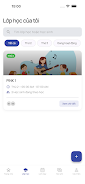

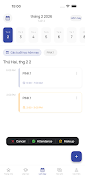
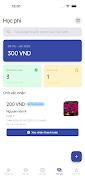
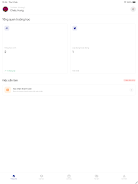
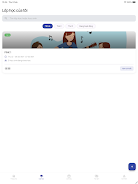
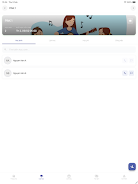

Clazz Teacher is a classroom management app built to help educators organize schedules, track attendance, manage tuition and maintain student records from a single interface. Clazz Teacher puts routine administrative tasks into a compact workflow so teachers can focus on lesson planning and student support: create and adjust daily, weekly or monthly schedules, mark attendance quickly, confirm tuition with receipts, and keep class information organized across subjects and locations.
Key features
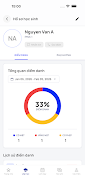
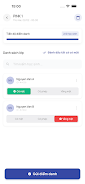
The core tools in Clazz Teacher mirror day-to-day classroom needs. Schedule management supports flexible lesson planning with options to add make-up lessons, cancel sessions or shift time zones for online classes; teachers can duplicate or modify recurring lessons to reflect changing timetables. Attendance tracking lets you record Present, Excused or Absent in a few taps and view attendance history by student or by class. Tuition management shows payment states such as Paid, Pending and Awaiting Confirmation, provides a place to attach receipt images from guardians, and surfaces monthly revenue and tuition summaries for quick bookkeeping. Student and class profiles store contact and guardian details, communication notes, and class-level metadata such as grade, subject and location; these pages are customizable with cover images and theme colors. Assignment tools allow setting homework with deadlines, attaching images or files, monitoring submission status, and sending deadline reminders. Notifications alert users to pending confirmations and upcoming sessions, and an available bilingual interface (Vietnamese and English) supports teachers in multilingual environments.
Controls and navigation
The app is designed for simple, gesture-friendly interactions that match common classroom workflows. Primary actions are reachable from a main dashboard where you tap to open class pages, swipe to move between days or weeks, and long-press or use contextual menus to edit or cancel lessons quickly. Attendance and tuition screens minimize typing: select statuses from a small palette, attach or view receipt photos, and use built-in filters to find recent confirmations or unresolved items. Search and quick-filter tools make it straightforward to locate a student record or a class session without deep menus, reducing the number of steps required during busy periods.
Progression and organization
Setting up Clazz Teacher follows a logical progression: create your institution or account, add classes grouped by grade or subject, enroll students and record guardian contacts, then build schedules and recurring lesson templates. Over time the app accumulates attendance histories and payment records that help you analyze trends—for example, recurring absences or monthly tuition patterns—and refine schedules or follow-up procedures. Class pages act as reusable units you can copy or adapt from term to term, which speeds the onboarding of new courses and supports consistent record keeping across an academic year.
Customization and visual style
The user interface favors clarity and legibility, with a clean layout that highlights upcoming sessions and unresolved tasks. Visual customization lets teachers personalize class pages with cover images and theme colors to make each group easy to recognize at a glance. Profile cards display essential information up front and expand to show communication history, attachments and recent activity. These modest personalization options help turn a generic schedule into a set of distinct class workspaces that reflect real classroom groupings.
Accessibility, offline use and data handling
Clazz Teacher aims to support different teaching contexts. Bilingual text in Vietnamese and English helps reduce language friction for many users. The interface includes scalable text sizes and straightforward navigation to improve readability and ease of use on phones and tablets. For situations with intermittent connectivity, the app allows capture of core information such as attendance and notes while offline, then synchronizes changes when a connection is available; this design keeps daily workflows functional even without constant internet access. Data handling focuses on local record keeping for class administration, with clear controls for viewing and confirming tuition receipts and reviewing historical summaries.
Routine value and continued use
Teachers will find repeated value in Clazz Teacher because its utility is tied to daily and weekly routines: schedule adjustments, attendance recording, tuition follow-ups and assignment checks recur through each term. The app’s summaries and trend views support short administrative reviews at the end of the week or month, helping educators identify follow-up priorities without manual spreadsheet work. Over time the accumulated profiles and histories make parent communication and class transitions smoother, saving time across terms.
Limitations
Current limitations include a language set confined to Vietnamese and English, and a tuition confirmation process that depends on guardians uploading receipt images, which can require additional verification steps in some cases. These constraints are important to consider when planning how to integrate Clazz Teacher into existing administrative workflows.