


Apps
Productivity
Podix Speech
Podix Speech

| Package ID: | |
|---|---|
| Latest Version: | v0.1.14 |
| Latest update: | May 13, 2026 13:26:05 |
| Developer: | LEVEREDGE GROUP LIMITED |
| Requirements: | Android |
| Category: | Productivity |
| Size: | 55.55 MB |
| Tags: | Common System Study |
Rating :4.1
Podix Speech is a focused practice app for the IELTS Speaking test that recreates examiner-style interviews, provides targeted training for each band descriptor, and helps learners practice with realistic timing and feedback. Podix Speech combines full mock tests and short drills to cover Parts 1–3, gives detailed scores in fluency, vocabulary, grammar and pronunciation, and generates concrete sample answers and study recommendations so users can practice efficiently at home or on the go.
Key Features
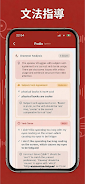
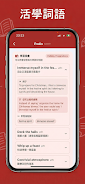
The app includes four professional practice modes: Quick Practice for short, focused questions to build confidence in day-to-day topics; Conversation Mode with dynamic follow-up prompts that mimic an interviewer’s responses; Pronunciation Training that analyzes phonemes and prosody; and a Full Mock Test that follows the real timing and structure of the IELTS speaking exam. Scoring is aligned with official IELTS criteria and breaks down performance into Fluency & Coherence, Lexical Resource, Grammatical Range & Accuracy, and Pronunciation, with concrete suggestions and sample answers to guide improvement. Podix Speech also offers word-level accuracy analysis, IPA guidance, native pronunciation playback, and an intelligent vocabulary system that marks IELTS-relevant words by band level and organizes them into review decks with example sentences and collocations.
How it works — controls and practice mechanics
Interaction is voice-first: users speak their answers and see real-time speech-to-text so they can compare spoken output with expected phrasing. Simple on-screen controls let you start, pause, and replay prompt audio, record responses, and listen to model answers. Timers and a built-in one-minute Part 2 preparation counter are visible during practice, while Conversation Mode adapts follow-up questions based on previous answers. Pronunciation drills give visual feedback on stress and intonation, and phoneme practice highlights problematic sounds. The app’s flow is straightforward: choose a mode, pick a topic or let the app randomize prompts, speak your response, review the automatic score and feedback, then follow suggested study actions.
Progression and study paths
Progression in Podix Speech is organized around band-aligned milestones and topic categories. The app generates personalized study paths based on initial diagnostic results, recommending a sequence of drills and vocabulary sessions to close identified gaps. Users can track their progress with periodic mini-tests, exportable PDF progress reports, and weekly summaries that show trends for each scoring criterion. As you improve, the system introduces more complex prompts and longer response windows so training moves from short practice into sustained speaking tasks. Sample answers and targeted exercises are tied to the learner’s band goals so practice focuses on realistic, achievable improvements.
Visual style, customization and controls
The app adopts a clean, distraction-free interface with clear typography and examiner avatar options to simulate different speaking partners. Customization options include accent selection for model speech (British or American), adjustable playback speed for model answers, font size settings, and a choice of timer visibility to suit test practice needs. Users can label favorite prompts, replay examiner-style audio, and switch between bilingual Traditional Chinese and English displays. Controls are intentionally simple to keep attention on speaking practice rather than on navigating menus.
Replay value, offline use and challenge systems
Replay value comes from randomized prompt pools, varied examiner personalities, and a spaced-repetition vocabulary review that resurfaces words and collocations at optimal intervals. Short micro-drills and longer mock exams can be repeated with different question sets, and each session records performance so you can revisit weaker areas. For convenience, some practice packs and vocabulary decks can be downloaded for offline review, allowing users to complete drills and flashcard reviews without a persistent connection. Challenge systems are built around timed tasks, progressive difficulty levels, and targeted pronunciation milestones rather than rankings or multiplayer features.
Accessibility and user experience
Podix Speech is designed for learners with varied needs: the bilingual interface supports Traditional Chinese and English, there are options to enlarge text and captions for model answers, and audio settings allow slowed playback for detailed listening. Visual phoneme guides and color-coded feedback help learners with hearing or processing differences understand where to focus. The app is optimized for mobile use, conserving data during speech processing, and provides clear troubleshooting guidance for recording and playback on common Android devices.
Known limitations
The free tier provides a limited amount of practice, so frequent users will likely consider a paid plan for extended access. Interface localization is currently limited to Traditional Chinese and English, and accent analysis focuses on British and American varieties, which may not cover all learners’ needs. The app aims to mirror the IELTS speaking structure and provide useful automated feedback, but users should complement app practice with live speaking opportunities when preparing for high-stakes exams.