
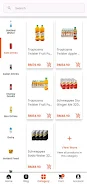
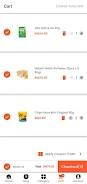



Sindepco FMCG, Sindepco FMCG and Sindepco FMCG help distributors and sales teams manage product catalogs, orders and deliveries through a simple mobile interface. The app supports order creation, customer management and inventory visibility to streamline daily operations for field representatives, wholesalers and store managers who need a lightweight tool for order processing and sales tracking.
Key capabilities
Sindepco FMCG offers practical features designed for day-to-day commercial routes: fast order entry with configurable price lookups, a browsable product catalog with images and descriptions, customer account pages that store contact and credit details, and a searchable order history to quickly repeat or review past transactions. Delivery tracking gives teams a clear view of outstanding shipments while low-stock alerts help prioritize replenishment.
Order workflow and controls
Creating and editing orders is optimized for touch screens: use quick search to find products, add quantities with plus/minus controls, and apply permitted discounts or price lists. Draft orders can be saved for later completion and order statuses progress from draft to submitted and fulfilled so field staff and back-office users share a consistent view. Validation checks highlight missing customer details or pricing mismatches before submission, reducing errors on the road.
Inventory visibility and delivery tracking
The app provides a concise inventory snapshot so users can see available stock and flagged low items at a glance. Delivery tracking records the status of each order and displays basic history for completed deliveries, making it easier to follow up on late shipments. Notifications and configurable threshold alerts notify users when items approach reorder levels, helping prevent out-of-stock situations in small stores and wholesale locations.
Reporting, exports and daily analytics
Sindepco FMCG includes on-device summaries of daily and weekly sales to support quick decision making. Managers can generate filtered exports for deeper analysis and share CSV or spreadsheet-compatible files with accounting systems. Built-in filters let users compare sales by product, customer or territory, and export options simplify reconciliation and routine reporting without complex desktop tools.
Customization, roles and permissions
The app supports typical distribution setups by respecting user roles and permissions: field representatives, supervisors and administrators see interfaces tailored to their tasks. Catalog visibility and price lists can be adjusted per customer group, and low-stock thresholds or report filters are configurable so each business can reflect its own commercial rules without changing the core app.
Visual design and user experience
Sindepco FMCG emphasizes clarity and efficiency over decorative elements: list-based product views, readable typography and clear action buttons reduce training time for new users. Search and filter controls are prominent to speed up order entry, and contextual help guides appear where errors are most likely. The straightforward layout keeps screen interactions short, which is important for staff that spend long hours visiting multiple customers.
Connectivity and support
The application synchronizes with backend services to keep pricing, catalog and customer records up to date and to push order data to central systems. It is designed to work in typical field conditions and to minimize data conflicts during synchronization; for integration details and account setup, contact your system administrator. In-app guidance and help text assist users with common tasks, and administrators can manage access centrally through their existing support channels.
Who benefits and getting started
Sindepco FMCG is intended for field representatives, wholesalers and store managers who want a lightweight, practical tool for processing orders, tracking deliveries and maintaining customer records. To get started, install the app, log in with the credentials provided by your organization, confirm your catalog and price settings and complete a short walk-through of order entry and reporting. Regular use of order history and exported summaries quickly reveals process improvements and saves time on routine reporting.